Reduce Support Tickets 50–70% by Fixing Product First for SaaS Teams
Reduce Support Tickets 50–70% by Fixing Product First for SaaS Teams
Insights
20 min

The fastest, most reliable way to reduce support tickets is to treat every ticket as a product signal and follow a strict sequence: fix what’s broken in the product first, build self-service for what’s left, then automate what remains. Skip a layer and you build an expensive patch instead of a permanent fix. Done in order, this sequence lowers ticket volume and gives you a measurable deflection rate you can defend to your executive team.
TL;DR:
Fix product issues directly linked to high-ticket categories by rewording error messages, renaming confusing labels, and addressing root causes identified through ticket taxonomy.
Use targeted self-service formats like in-app tooltips, decision-tree guides, or full walkthroughs depending on question complexity to increase deflection rates.
Implement layered automation for repetitive and low-risk questions, ensuring accuracy by mapping customer intents and providing full conversation context to agents.
Prioritize fixes based on impact, calculated as ticket volume times deflectability divided by cost, then re-measure improvements at 30 days before acting further.
Establish formal feedback loops between support, product, and documentation teams to address specific root causes and prevent recurring issues proactively.
DroxyAnswer Support Questions InstantlyDroxy helps businesses provide 24/7 answers across website chat, phone, WhatsApp, Instagram, Facebook, and Shopify.Explore Droxy
Table of Contents
How Do You Reduce Support Tickets by Fixing the Product First?
What Self-Service Formats Actually Cut Down on Support Tickets?
When Should You Automate Support with an AI Chatbot?
How Do You Prioritize Fixes and Prove They Worked?
Turning First Contact Resolution Into a Training Priority
Why Ticket Feedback Loops Matter More Than Ticket Volume Alone
What Ticket Categorization Reveals About Root Causes
Can Proactive Alerts Stop Tickets Before They Start?
Does Multi-Channel Consistency Reduce Repeat Support Tickets?
How a No-Code AI Agent Fits Into the Three-Layer Model
Automate What’s Left Without Losing the Human Touch
Sources
How Do You Reduce Support Tickets by Fixing the Product First?
Most support teams reach for a chatbot before they’ve asked the harder question: why is this ticket happening at all? Upstream product fixes are the highest-impact method to reduce ticket volume, and that’s because a fixed bug or a clearer label eliminates a ticket category permanently. A chatbot just answers the same broken question faster.
Start by building a ticket taxonomy instead of relying on vague tags like “billing” or “other.” Break categories down to the level of the specific screen, field, or workflow step that triggered the contact. Patterns hide in generality. Once you tag tickets by exact trigger point, you’ll usually find that three or four narrow issues account for a disproportionate share of monthly volume.
From there, audit your onboarding and first-activation funnels the way a product team audits a checkout flow. Instrument every drop-off point. If 40% of new users abandon setup at the same step, that step is generating tickets you haven’t even connected to onboarding yet.
Here’s a practical sequence for turning ticket data into product fixes:
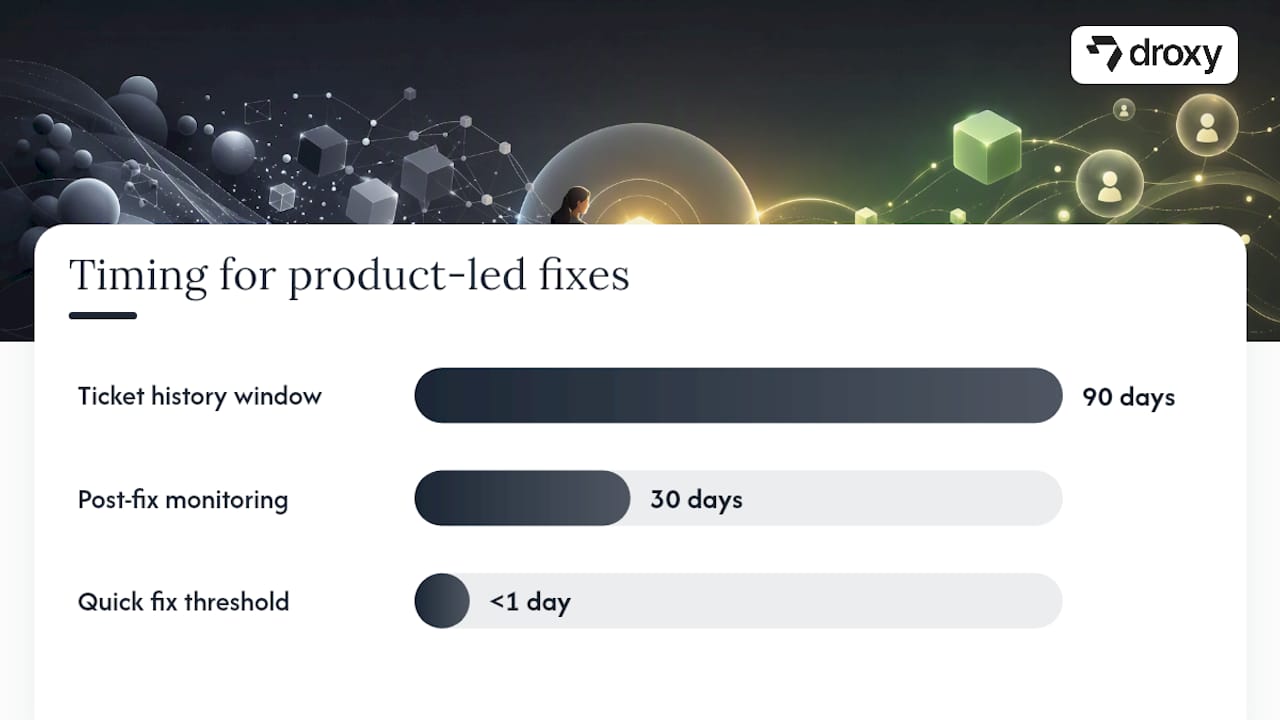
Pull the last 90 days of tickets and group them by root screen or feature, not by department.
Rank categories by raw volume, then flag the ones tied to a single confusing element (a label, an error message, a missing confirmation screen).
Ship the smallest fix that addresses the confusion directly, such as rewording an error message or renaming a button.
Track the category’s ticket count for the next 30 days to confirm the fix worked before moving to the next one.
For anything that can’t be fixed in the product without a larger engineering effort, route it to self-service instead of waiting on a roadmap slot.
Deciding between a bug fix and a self-service article comes down to scope. If the confusion stems from something the product genuinely does wrong, that’s a bug. If the product works as intended but the workflow isn’t obvious, that’s a documentation or in-app guidance gap.
Pro Tip: Before you file a single self-service article, ask whether the confusing element can be renamed, reworded, or removed in under a day. A five-word label change often kills more tickets than a 2,000-word help article ever will.
What Self-Service Formats Actually Cut Down on Support Tickets?
Not every self-service format deflects the same kind of question, and using the wrong one wastes both your writing time and the customer’s patience. Contextual self-service, including in-app tooltips and interactive walkthroughs paired with a searchable knowledge base, substantially raises deflection rates because it meets people at the exact moment they’re confused instead of asking them to leave the product and go searching.
Match the format to the complexity of the task:
Use a searchable knowledge base for reference questions people look up once and forget, like “what does this permission level mean.”
Use interactive guides or decision-tree flows for multi-step processes where a static article can’t capture branching logic.
Use in-app tooltips for single-field confusion, like an unclear input requirement.
Use full walkthroughs for complex workflows customers repeat often, since interactive guidance outperforms static docs by letting users learn by doing inside the product itself.
Knowledge base hygiene matters more than most teams assume. Delete duplicate articles, since they split your search relevance and confuse your own support agents. Write titles in the customer’s language, not your internal product vocabulary. If your app calls something a “workspace” but customers keep calling it a “project,” title the article with the customer’s word.
Deflection reality check: Search and discoverability, not the sheer number of articles you’ve published, is the most common reason knowledge bases fail. Teams that tag content using actual customer search terms and track zero-result searches find their real content gaps within weeks instead of guessing at them.
For placement, tooltips should appear the first time a user encounters a field, not on every visit. Walkthrough triggers work best tied to an action, like clicking “publish” for the first time, rather than a generic “need help?” button nobody clicks. Track two numbers religiously: help article views versus tickets filed for the same topic (your practical deflection signal), and your zero-result search rate, which tells you exactly where customers are looking for answers you haven’t written yet.
When Should You Automate Support with an AI Chatbot?
Automation earns its keep on questions that are repetitive, low-context, and don’t require judgment. Password resets, order status checks, billing status lookups, and availability questions are the classic candidates because the answer lives in a system record, not in nuance.
Automation fails, sometimes badly, when it’s asked to substitute for the prevention and self-service work you haven’t done yet. AI-powered support reduces ticket volume most effectively when it’s layered on top of solid self-service, not used as a replacement for it. A bot trained on a thin, disorganized knowledge base just becomes a faster way to frustrate customers.
To train a bot well:
Map every knowledge base article to a specific customer intent, not a topic category.
Log every question the bot fails to answer confidently, then treat that log as a content backlog for your KB team.
Build explicit hand-off rules: if a customer expresses frustration, repeats a question, or the bot’s confidence score drops below a threshold, route to a human immediately rather than looping.
Give agents full conversation history at hand-off so customers never repeat themselves.
Deflection outcomes depend heavily on what you’ve built underneath the bot. Teams that build prevention and self-service first often reach 50 to 70% deflection once automation goes live, because the bot is answering genuinely simple questions instead of covering for a broken product. Worth noting: customers already try self-service first in large numbers, and a slow or wrong bot answer sends them straight to a ticket, so accuracy matters more than speed. For a sense of what well-scoped automation looks like in practice, these customer service use cases show the range from simple lookups to more guided interactions.
How Do You Prioritize Fixes and Prove They Worked?
Not every friction point deserves the same attention, and guessing wastes engineering time. A simple formula keeps prioritization honest: impact equals ticket volume multiplied by deflectability, divided by cost to fix. A high-volume category that’s cheap to fix and easy to deflect always beats a rare edge case, no matter how technically interesting it is.
Calculate your baseline deflection rate before touching anything: help content views on a topic divided by tickets still filed on that same topic. That ratio is your starting point, and ranking the top three friction points that account for the bulk of preventable tickets gives you a manageable first sprint instead of an overwhelming backlog.
Baseline every ticket category’s volume and current deflection rate.
Score each category using the impact formula above.
Fix the top three, re-measure at 30 days, and report the delta to product and executive stakeholders.
Metric | What it tells you | How to calculate it |
|---|---|---|
Deflection rate | Whether self-service is working | Help views ÷ (help views + tickets on same topic) |
Ticket volume by category | Where to focus first | Count tickets per taxonomy tag over 30/90 days |
Zero-result search rate | Content gaps in your KB | Searches with no matching article ÷ total searches |
First contact resolution | Agent and bot effectiveness | Tickets closed without escalation ÷ total tickets |
Report results in ticket counts and dollar terms, not just percentages. Executives respond to “we cut 400 monthly tickets in the billing category,” not an abstract deflection score.
Turning First Contact Resolution Into a Training Priority
A ticket that bounces between three agents before resolution costs you three times the effort and a frustrated customer at the end of it. First contact resolution rises when agents have two things: fast access to the same knowledge base customers use, and clear escalation criteria that don’t depend on guesswork.
Train new agents against real, categorized ticket transcripts instead of generic scripts. Nothing teaches pattern recognition faster than seeing 20 real examples of the same billing confusion and how a senior agent resolved each one differently based on account context.
Give your team a living reference, not a static manual. If your knowledge base is well organized, as covered above, agents should be searching the exact same articles customers do. When agents find themselves improvising an answer that isn’t documented anywhere, that’s a signal the documentation team missed a gap, not a reason to let the improvisation become tribal knowledge.
Build in a short weekly review of tickets that took multiple touches to close. Ask the same question every time: was the delay caused by missing information, unclear escalation paths, or a genuine product limitation? That fifteen-minute habit surfaces training gaps faster than any formal review cycle, and it keeps your team’s first contact resolution rate climbing instead of drifting sideways.
Why Ticket Feedback Loops Matter More Than Ticket Volume Alone
A support team that only closes tickets is treating symptoms. A support team that routes ticket patterns back to product and documentation teams is treating causes, and that difference compounds over months.
Set up a formal, recurring channel between support and product, not an informal Slack message when someone remembers. A monthly ticket digest showing top categories by volume, tagged by root cause, gives product managers something concrete to weigh against their own roadmap priorities. Vague complaints get deprioritized. Specific data with ticket counts attached gets addressed.
The same loop needs to run to your documentation team. Every time a bot or an agent fails to find an answer in the knowledge base, that failure should land in a backlog the documentation owner actually reviews, not disappear into a support queue log nobody revisits.
The most functional teams assign an owner on both sides: someone in support responsible for packaging ticket insights into something product can act on, and someone in product or documentation responsible for closing the loop back with what changed. Without that ownership, feedback loops decay into good intentions that never survive a busy sprint.
What Ticket Categorization Reveals About Root Causes
Categorizing tickets by symptom, like “can’t log in,” misses the actual root cause hiding underneath. Categorizing by cause, like “password reset email delayed by spam filter,” gives you something you can actually fix.
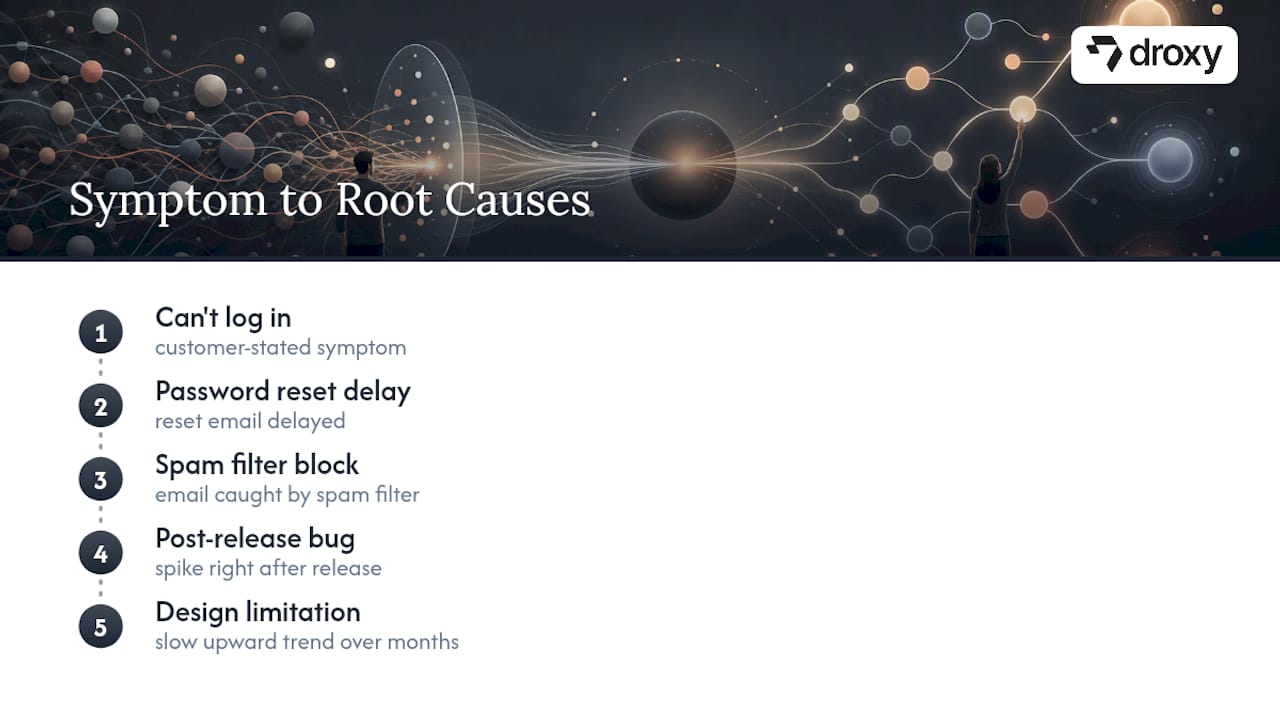
Build your taxonomy around root cause from the start rather than retrofitting it later. That means training agents to tag the underlying issue, not just the customer’s stated symptom, since two customers describing the same complaint can have entirely different causes.
Trend analysis becomes far more useful once causes are tagged cleanly. A spike in a specific category right after a release almost always points to that release, and catching it within days rather than weeks saves you from a month of avoidable tickets. Look for categories that trend upward slowly over months, too. Those often signal a growing user segment hitting a limitation your original design never anticipated, not a sudden bug.
Review trends on a fixed cadence, weekly for spikes and monthly for slow drift, so root cause analysis becomes a habit built into your operations instead of a forensic exercise you only run after a bad quarter.
Can Proactive Alerts Stop Tickets Before They Start?
Some of the most preventable tickets never need a knowledge base article or a chatbot at all. They need a heads up. When a known issue is already in progress, a proactive status banner or an in-app alert stops the flood of “is this broken?” tickets before support even opens for the day.
Announcements work the same way for planned changes. If a feature is being deprecated, changing behavior, or scheduled for maintenance, telling customers in advance, inside the product where they’ll actually see it, prevents the confused tickets that show up the moment the change lands unannounced.
Build a simple decision rule: any change likely to affect more than a small slice of your user base gets a proactive notice before it ships, not after tickets start rolling in. Pair that with real-time status alerts for outages, since customers who already know about a known issue rarely bother filing a ticket about it. The gap between “silent change” and “announced change” is often the difference between ten tickets and two hundred.
Does Multi-Channel Consistency Reduce Repeat Support Tickets?
Customers don’t think in channels. They think in problems. If a customer gets one answer from your chatbot, a different answer from a phone agent, and a third answer from a support email reply, they’ll open a new ticket just to get clarity, and now you’ve tripled your own workload on a single issue.
Consistency starts with a single source of truth. Every channel, whether it’s a website chat widget, WhatsApp, phone support, or social media, should pull from the same knowledge base and the same current policies. When agents on different channels work from different documents, inconsistent answers are inevitable, and inconsistent answers generate repeat tickets almost by design.
Handoffs between channels need the same discipline. A customer who starts on chat and gets escalated to phone shouldn’t have to repeat their entire issue from scratch. Passing context along with the escalation, not just the ticket number, cuts resolution time and stops the frustrated follow-up ticket that says “I already explained this.”
How a No-Code AI Agent Fits Into the Three-Layer Model
Once product fixes and self-service are genuinely solid, the remaining tickets tend to be simple, repetitive, and spread across channels your team can’t staff around the clock. That’s where a configurable AI agent earns its place, not as a replacement for the earlier layers, but as coverage for what’s left. Droxy pulls knowledge base content into agents deployed across website chat, phone, WhatsApp, Instagram, and Facebook, so a customer asking about order status at midnight gets an answer instead of a queue position.
In practice, this looks like routing simple, high-volume questions straight to the agent, letting it surface gaps in your knowledge base when it can’t answer confidently, and handing off anything genuinely complex to a human with full context attached, including images or audio the customer already sent. That combination closes the loop the earlier layers set up.
— Elena
Automate What’s Left Without Losing the Human Touch
Once your product fixes and self-service content are doing their job, the tickets that remain are usually the ones worth automating rather than staffing around the clock, as explained in why brands should use SaaS SEO for sustainable growth. Droxy is a no-code platform for deploying AI agents that answer from your existing knowledge base and hand off cleanly to a human when a question needs judgment, across website chat, phone, WhatsApp, Instagram, and Facebook.

If your ticket volume skews toward order status, appointment questions, or account lookups, the AI powered Website agent is a practical starting point, since it connects directly to your existing help content without requiring a developer to build it. Setup generally does not require code, and such agents can be customized to match a brand’s voice rather than sounding like a generic bot bolted onto a site.
Plans start at $16 a month on the Basic tier, scaling up to Advanced and Enterprise as your ticket volume and channel needs grow. If you’ve already done the harder work of fixing product friction and building out self-service, the next step is testing whether automation can handle what’s left. Start a trial and map your top ticket categories against what the agent can realistically deflect before your next quarterly review.
Sources
How to Reduce Support Ticket Volume: The Prevention-First Playbook for SaaS Teams in 2026
Best 9 ways to reduce support tickets in 2026 - Guideflow Blog
Decreasing support ticket volume using AI-powered customer support
FAQ
How Do You Reduce Support Tickets?
Fix the product issue causing the confusion first, then build self-service content for what can’t be fixed immediately, then automate the repetitive questions that remain. This prevention-first sequence produces far higher deflection than deploying a chatbot on top of unfixed product friction.
What Does a Support Ticket Mean?
A support ticket is a recorded customer request for help, tracked from the moment it’s submitted until it’s resolved. Each ticket typically carries metadata like category, priority, and channel, which is exactly the data you need to categorize by root cause and spot recurring patterns.
How Do You Reduce Customer Support Costs?
Costs drop when ticket volume drops, and that happens by eliminating the product issues generating tickets rather than simply adding more agents or a bot. Teams that build solid self-service before adding automation tend to see deflection in the 50 to 70% range, compared to 20 to 30% when automation is deployed without those foundations.
What Does Claiming a Support Ticket Do?
Claiming a ticket assigns it to a specific agent, so it’s clear who owns the response and customers aren’t waiting on an unassigned queue. It also prevents duplicate replies from multiple agents working the same issue without realizing it.
Can Droxy Help Reduce Support Ticket Volume?
Droxy deploys AI agents trained on your existing knowledge base across channels like website chat, WhatsApp, and phone, aimed at deflecting repetitive, low-complexity questions once your product fixes and self-service content are in place. Current pricing, starting at $16 a month, is listed on the Droxy site.
Recommended
The fastest, most reliable way to reduce support tickets is to treat every ticket as a product signal and follow a strict sequence: fix what’s broken in the product first, build self-service for what’s left, then automate what remains. Skip a layer and you build an expensive patch instead of a permanent fix. Done in order, this sequence lowers ticket volume and gives you a measurable deflection rate you can defend to your executive team.
TL;DR:
Fix product issues directly linked to high-ticket categories by rewording error messages, renaming confusing labels, and addressing root causes identified through ticket taxonomy.
Use targeted self-service formats like in-app tooltips, decision-tree guides, or full walkthroughs depending on question complexity to increase deflection rates.
Implement layered automation for repetitive and low-risk questions, ensuring accuracy by mapping customer intents and providing full conversation context to agents.
Prioritize fixes based on impact, calculated as ticket volume times deflectability divided by cost, then re-measure improvements at 30 days before acting further.
Establish formal feedback loops between support, product, and documentation teams to address specific root causes and prevent recurring issues proactively.
DroxyAnswer Support Questions InstantlyDroxy helps businesses provide 24/7 answers across website chat, phone, WhatsApp, Instagram, Facebook, and Shopify.Explore Droxy
Table of Contents
How Do You Reduce Support Tickets by Fixing the Product First?
What Self-Service Formats Actually Cut Down on Support Tickets?
When Should You Automate Support with an AI Chatbot?
How Do You Prioritize Fixes and Prove They Worked?
Turning First Contact Resolution Into a Training Priority
Why Ticket Feedback Loops Matter More Than Ticket Volume Alone
What Ticket Categorization Reveals About Root Causes
Can Proactive Alerts Stop Tickets Before They Start?
Does Multi-Channel Consistency Reduce Repeat Support Tickets?
How a No-Code AI Agent Fits Into the Three-Layer Model
Automate What’s Left Without Losing the Human Touch
Sources
How Do You Reduce Support Tickets by Fixing the Product First?
Most support teams reach for a chatbot before they’ve asked the harder question: why is this ticket happening at all? Upstream product fixes are the highest-impact method to reduce ticket volume, and that’s because a fixed bug or a clearer label eliminates a ticket category permanently. A chatbot just answers the same broken question faster.
Start by building a ticket taxonomy instead of relying on vague tags like “billing” or “other.” Break categories down to the level of the specific screen, field, or workflow step that triggered the contact. Patterns hide in generality. Once you tag tickets by exact trigger point, you’ll usually find that three or four narrow issues account for a disproportionate share of monthly volume.
From there, audit your onboarding and first-activation funnels the way a product team audits a checkout flow. Instrument every drop-off point. If 40% of new users abandon setup at the same step, that step is generating tickets you haven’t even connected to onboarding yet.
Here’s a practical sequence for turning ticket data into product fixes:
Pull the last 90 days of tickets and group them by root screen or feature, not by department.
Rank categories by raw volume, then flag the ones tied to a single confusing element (a label, an error message, a missing confirmation screen).
Ship the smallest fix that addresses the confusion directly, such as rewording an error message or renaming a button.
Track the category’s ticket count for the next 30 days to confirm the fix worked before moving to the next one.
For anything that can’t be fixed in the product without a larger engineering effort, route it to self-service instead of waiting on a roadmap slot.
Deciding between a bug fix and a self-service article comes down to scope. If the confusion stems from something the product genuinely does wrong, that’s a bug. If the product works as intended but the workflow isn’t obvious, that’s a documentation or in-app guidance gap.
Pro Tip: Before you file a single self-service article, ask whether the confusing element can be renamed, reworded, or removed in under a day. A five-word label change often kills more tickets than a 2,000-word help article ever will.
What Self-Service Formats Actually Cut Down on Support Tickets?
Not every self-service format deflects the same kind of question, and using the wrong one wastes both your writing time and the customer’s patience. Contextual self-service, including in-app tooltips and interactive walkthroughs paired with a searchable knowledge base, substantially raises deflection rates because it meets people at the exact moment they’re confused instead of asking them to leave the product and go searching.
Match the format to the complexity of the task:
Use a searchable knowledge base for reference questions people look up once and forget, like “what does this permission level mean.”
Use interactive guides or decision-tree flows for multi-step processes where a static article can’t capture branching logic.
Use in-app tooltips for single-field confusion, like an unclear input requirement.
Use full walkthroughs for complex workflows customers repeat often, since interactive guidance outperforms static docs by letting users learn by doing inside the product itself.
Knowledge base hygiene matters more than most teams assume. Delete duplicate articles, since they split your search relevance and confuse your own support agents. Write titles in the customer’s language, not your internal product vocabulary. If your app calls something a “workspace” but customers keep calling it a “project,” title the article with the customer’s word.
Deflection reality check: Search and discoverability, not the sheer number of articles you’ve published, is the most common reason knowledge bases fail. Teams that tag content using actual customer search terms and track zero-result searches find their real content gaps within weeks instead of guessing at them.
For placement, tooltips should appear the first time a user encounters a field, not on every visit. Walkthrough triggers work best tied to an action, like clicking “publish” for the first time, rather than a generic “need help?” button nobody clicks. Track two numbers religiously: help article views versus tickets filed for the same topic (your practical deflection signal), and your zero-result search rate, which tells you exactly where customers are looking for answers you haven’t written yet.
When Should You Automate Support with an AI Chatbot?
Automation earns its keep on questions that are repetitive, low-context, and don’t require judgment. Password resets, order status checks, billing status lookups, and availability questions are the classic candidates because the answer lives in a system record, not in nuance.
Automation fails, sometimes badly, when it’s asked to substitute for the prevention and self-service work you haven’t done yet. AI-powered support reduces ticket volume most effectively when it’s layered on top of solid self-service, not used as a replacement for it. A bot trained on a thin, disorganized knowledge base just becomes a faster way to frustrate customers.
To train a bot well:
Map every knowledge base article to a specific customer intent, not a topic category.
Log every question the bot fails to answer confidently, then treat that log as a content backlog for your KB team.
Build explicit hand-off rules: if a customer expresses frustration, repeats a question, or the bot’s confidence score drops below a threshold, route to a human immediately rather than looping.
Give agents full conversation history at hand-off so customers never repeat themselves.
Deflection outcomes depend heavily on what you’ve built underneath the bot. Teams that build prevention and self-service first often reach 50 to 70% deflection once automation goes live, because the bot is answering genuinely simple questions instead of covering for a broken product. Worth noting: customers already try self-service first in large numbers, and a slow or wrong bot answer sends them straight to a ticket, so accuracy matters more than speed. For a sense of what well-scoped automation looks like in practice, these customer service use cases show the range from simple lookups to more guided interactions.
How Do You Prioritize Fixes and Prove They Worked?
Not every friction point deserves the same attention, and guessing wastes engineering time. A simple formula keeps prioritization honest: impact equals ticket volume multiplied by deflectability, divided by cost to fix. A high-volume category that’s cheap to fix and easy to deflect always beats a rare edge case, no matter how technically interesting it is.
Calculate your baseline deflection rate before touching anything: help content views on a topic divided by tickets still filed on that same topic. That ratio is your starting point, and ranking the top three friction points that account for the bulk of preventable tickets gives you a manageable first sprint instead of an overwhelming backlog.
Baseline every ticket category’s volume and current deflection rate.
Score each category using the impact formula above.
Fix the top three, re-measure at 30 days, and report the delta to product and executive stakeholders.
Metric | What it tells you | How to calculate it |
|---|---|---|
Deflection rate | Whether self-service is working | Help views ÷ (help views + tickets on same topic) |
Ticket volume by category | Where to focus first | Count tickets per taxonomy tag over 30/90 days |
Zero-result search rate | Content gaps in your KB | Searches with no matching article ÷ total searches |
First contact resolution | Agent and bot effectiveness | Tickets closed without escalation ÷ total tickets |
Report results in ticket counts and dollar terms, not just percentages. Executives respond to “we cut 400 monthly tickets in the billing category,” not an abstract deflection score.
Turning First Contact Resolution Into a Training Priority
A ticket that bounces between three agents before resolution costs you three times the effort and a frustrated customer at the end of it. First contact resolution rises when agents have two things: fast access to the same knowledge base customers use, and clear escalation criteria that don’t depend on guesswork.
Train new agents against real, categorized ticket transcripts instead of generic scripts. Nothing teaches pattern recognition faster than seeing 20 real examples of the same billing confusion and how a senior agent resolved each one differently based on account context.
Give your team a living reference, not a static manual. If your knowledge base is well organized, as covered above, agents should be searching the exact same articles customers do. When agents find themselves improvising an answer that isn’t documented anywhere, that’s a signal the documentation team missed a gap, not a reason to let the improvisation become tribal knowledge.
Build in a short weekly review of tickets that took multiple touches to close. Ask the same question every time: was the delay caused by missing information, unclear escalation paths, or a genuine product limitation? That fifteen-minute habit surfaces training gaps faster than any formal review cycle, and it keeps your team’s first contact resolution rate climbing instead of drifting sideways.
Why Ticket Feedback Loops Matter More Than Ticket Volume Alone
A support team that only closes tickets is treating symptoms. A support team that routes ticket patterns back to product and documentation teams is treating causes, and that difference compounds over months.
Set up a formal, recurring channel between support and product, not an informal Slack message when someone remembers. A monthly ticket digest showing top categories by volume, tagged by root cause, gives product managers something concrete to weigh against their own roadmap priorities. Vague complaints get deprioritized. Specific data with ticket counts attached gets addressed.
The same loop needs to run to your documentation team. Every time a bot or an agent fails to find an answer in the knowledge base, that failure should land in a backlog the documentation owner actually reviews, not disappear into a support queue log nobody revisits.
The most functional teams assign an owner on both sides: someone in support responsible for packaging ticket insights into something product can act on, and someone in product or documentation responsible for closing the loop back with what changed. Without that ownership, feedback loops decay into good intentions that never survive a busy sprint.
What Ticket Categorization Reveals About Root Causes
Categorizing tickets by symptom, like “can’t log in,” misses the actual root cause hiding underneath. Categorizing by cause, like “password reset email delayed by spam filter,” gives you something you can actually fix.
Build your taxonomy around root cause from the start rather than retrofitting it later. That means training agents to tag the underlying issue, not just the customer’s stated symptom, since two customers describing the same complaint can have entirely different causes.
Trend analysis becomes far more useful once causes are tagged cleanly. A spike in a specific category right after a release almost always points to that release, and catching it within days rather than weeks saves you from a month of avoidable tickets. Look for categories that trend upward slowly over months, too. Those often signal a growing user segment hitting a limitation your original design never anticipated, not a sudden bug.
Review trends on a fixed cadence, weekly for spikes and monthly for slow drift, so root cause analysis becomes a habit built into your operations instead of a forensic exercise you only run after a bad quarter.
Can Proactive Alerts Stop Tickets Before They Start?
Some of the most preventable tickets never need a knowledge base article or a chatbot at all. They need a heads up. When a known issue is already in progress, a proactive status banner or an in-app alert stops the flood of “is this broken?” tickets before support even opens for the day.
Announcements work the same way for planned changes. If a feature is being deprecated, changing behavior, or scheduled for maintenance, telling customers in advance, inside the product where they’ll actually see it, prevents the confused tickets that show up the moment the change lands unannounced.
Build a simple decision rule: any change likely to affect more than a small slice of your user base gets a proactive notice before it ships, not after tickets start rolling in. Pair that with real-time status alerts for outages, since customers who already know about a known issue rarely bother filing a ticket about it. The gap between “silent change” and “announced change” is often the difference between ten tickets and two hundred.
Does Multi-Channel Consistency Reduce Repeat Support Tickets?
Customers don’t think in channels. They think in problems. If a customer gets one answer from your chatbot, a different answer from a phone agent, and a third answer from a support email reply, they’ll open a new ticket just to get clarity, and now you’ve tripled your own workload on a single issue.
Consistency starts with a single source of truth. Every channel, whether it’s a website chat widget, WhatsApp, phone support, or social media, should pull from the same knowledge base and the same current policies. When agents on different channels work from different documents, inconsistent answers are inevitable, and inconsistent answers generate repeat tickets almost by design.
Handoffs between channels need the same discipline. A customer who starts on chat and gets escalated to phone shouldn’t have to repeat their entire issue from scratch. Passing context along with the escalation, not just the ticket number, cuts resolution time and stops the frustrated follow-up ticket that says “I already explained this.”
How a No-Code AI Agent Fits Into the Three-Layer Model
Once product fixes and self-service are genuinely solid, the remaining tickets tend to be simple, repetitive, and spread across channels your team can’t staff around the clock. That’s where a configurable AI agent earns its place, not as a replacement for the earlier layers, but as coverage for what’s left. Droxy pulls knowledge base content into agents deployed across website chat, phone, WhatsApp, Instagram, and Facebook, so a customer asking about order status at midnight gets an answer instead of a queue position.
In practice, this looks like routing simple, high-volume questions straight to the agent, letting it surface gaps in your knowledge base when it can’t answer confidently, and handing off anything genuinely complex to a human with full context attached, including images or audio the customer already sent. That combination closes the loop the earlier layers set up.
— Elena
Automate What’s Left Without Losing the Human Touch
Once your product fixes and self-service content are doing their job, the tickets that remain are usually the ones worth automating rather than staffing around the clock, as explained in why brands should use SaaS SEO for sustainable growth. Droxy is a no-code platform for deploying AI agents that answer from your existing knowledge base and hand off cleanly to a human when a question needs judgment, across website chat, phone, WhatsApp, Instagram, and Facebook.
If your ticket volume skews toward order status, appointment questions, or account lookups, the AI powered Website agent is a practical starting point, since it connects directly to your existing help content without requiring a developer to build it. Setup generally does not require code, and such agents can be customized to match a brand’s voice rather than sounding like a generic bot bolted onto a site.
Plans start at $16 a month on the Basic tier, scaling up to Advanced and Enterprise as your ticket volume and channel needs grow. If you’ve already done the harder work of fixing product friction and building out self-service, the next step is testing whether automation can handle what’s left. Start a trial and map your top ticket categories against what the agent can realistically deflect before your next quarterly review.
Sources
How to Reduce Support Ticket Volume: The Prevention-First Playbook for SaaS Teams in 2026
Best 9 ways to reduce support tickets in 2026 - Guideflow Blog
Decreasing support ticket volume using AI-powered customer support
FAQ
How Do You Reduce Support Tickets?
Fix the product issue causing the confusion first, then build self-service content for what can’t be fixed immediately, then automate the repetitive questions that remain. This prevention-first sequence produces far higher deflection than deploying a chatbot on top of unfixed product friction.
What Does a Support Ticket Mean?
A support ticket is a recorded customer request for help, tracked from the moment it’s submitted until it’s resolved. Each ticket typically carries metadata like category, priority, and channel, which is exactly the data you need to categorize by root cause and spot recurring patterns.
How Do You Reduce Customer Support Costs?
Costs drop when ticket volume drops, and that happens by eliminating the product issues generating tickets rather than simply adding more agents or a bot. Teams that build solid self-service before adding automation tend to see deflection in the 50 to 70% range, compared to 20 to 30% when automation is deployed without those foundations.
What Does Claiming a Support Ticket Do?
Claiming a ticket assigns it to a specific agent, so it’s clear who owns the response and customers aren’t waiting on an unassigned queue. It also prevents duplicate replies from multiple agents working the same issue without realizing it.
Can Droxy Help Reduce Support Ticket Volume?
Droxy deploys AI agents trained on your existing knowledge base across channels like website chat, WhatsApp, and phone, aimed at deflecting repetitive, low-complexity questions once your product fixes and self-service content are in place. Current pricing, starting at $16 a month, is listed on the Droxy site.
Recommended



🚀
Powered by Droxy
Turn every interaction into a conversion
Customer facing AI agents that engage, convert, and support so you can scale what matters.
✨
Learn more
Recent posts

Insights
3 min read
Introducing Agent Memories
Improve your agents' performance with Agent Memories. Prevent agents from repeating the same mistakes by giving them feedback.
Read more

Insights
15 min read
HVAC Marketing in 2025: The Definitive Lead Gen Guide
Discover 15 proven HVAC marketing strategies, plus learn how Droxy's AI website agent converts curious visitors into qualified leads by answering their questions instantly - right when they're most interested in your services.
Read more

Insights
10 min read
10 Best AI Sales Agents in 2025: Tested & Ranked
Discover the top 10 AI sales agents of 2025, designed to enhance lead generation, personalize outreach, and ultimately, close more deals
Read more
Insights
3 min read
Introducing Agent Memories
Improve your agents' performance with Agent Memories. Prevent agents from repeating the same mistakes by giving them feedback.
Read more
Insights
15 min read
HVAC Marketing in 2025: The Definitive Lead Gen Guide
Discover 15 proven HVAC marketing strategies, plus learn how Droxy's AI website agent converts curious visitors into qualified leads by answering their questions instantly - right when they're most interested in your services.
Read more