15–30 Minute Developer Quick Start to Build Messenger Chatbots in 2026
15–30 Minute Developer Quick Start to Build Messenger Chatbots in 2026
Insights
17 min

Every working Messenger bot needs the same four pieces: a Facebook Page, a Meta app, a Page access token, and a verified webhook. If you want the fastest route, authorize a no-code platform against your Page and skip the server work entirely; if you want full control, a minimal webhook server hosted behind HTTPS gets you there in under an hour. Either way, ignore any tutorial published before this year. Several message tags now return error 100, and the old Chat Plugin is no longer in the docs.
TL;DR:
Building a Messenger bot requires a Facebook Page, a Meta app, a Page access token, and a verified webhook, with production needing App Review for stranger interactions.
Using a no-code platform simplifies setup to around 12 minutes but limits customization, while creating a minimal webhook server offers full control with a slightly longer setup time.
Successful deployment demands HTTPS hosting, environment variable management, and diligent testing of all event types, response times, and fallback handling before going live.
Messaging outside the 24-hour window requires specific tags or alternative APIs, and outdated tutorials fail to reflect recent platform restrictions and deprecated features.
For faster, less technical solutions, Droxy automates authorization, hosting, and human handover, starting at $16 per month, suitable for agencies managing multiple client pages.
DroxyBuild Messenger Support Without Server WorkDroxy helps businesses deploy customizable AI agents on Facebook and other channels, providing instant answers while keeping interactions aligned with their brand voice.Explore Droxy
Table of Contents
Prerequisites for Building a Messenger Chatbot
The Fastest Path to a Working Bot
Building the Webhook and Reply Logic
Deploying and Securing Your Webhook
Testing and Debugging Your Bot Before Launch
Production Rules That Break Bots in 2026
Using Templates, Quick Replies, and Human Handover
Why This Guide Reflects Real 2026 Platform Behavior
What Most Tutorials Get Wrong About This Build
When Droxy Makes More Sense Than a Custom Build
Where to Go Deeper on the Platform
Sources
Prerequisites for Building a Messenger Chatbot
Before writing a line of code, you need four accounts configured correctly, or nothing downstream will work. This is the part developers rush, and it’s the part that causes half the “my bot won’t respond” bug reports.
You need a Facebook Page (the bot’s identity), a Meta Business or Developer app tied to that Page, a Page access token generated inside that app, and a webhook endpoint the app can call. Each piece depends on the last: no Page means no token, no token means no webhook subscription. If your app only sends and receives messages for your own Page, Meta doesn’t require App Review for that Standard Access. The moment you want strangers to message your bot in production, you need Advanced Access, and that means submitting for App Review with the business_management permission and a demonstration of your use case.
Set these up before touching code:
A Facebook Page you administer, connected to a Meta Business Manager account
A Meta app created in the developer dashboard with the Messenger product added
A generated Page access token, copied somewhere secure, not into a chat log
Environment variables reserved for
PAGE_ACCESS_TOKEN,APP_SECRET, andVERIFY_TOKEN
The Fastest Path to a Working Bot
You have two realistic options, and the right one depends on how much control you actually need versus how fast you need something live.
Option A: No-code OAuth. You authorize a platform against your Facebook Page, it provisions the app, generates the token, and registers the webhook automatically. A hands-on build test for a basic FAQ bot took about 12 minutes using this route. The tradeoff is customization ceiling: you’re working inside someone else’s send logic, which is fine for support flows and terrible for anything that needs custom NLP branching.
Option B: Minimal webhook server. This takes longer, usually 15 to 30 minutes if you’ve done it before, but you own every line of logic. The sequence:
Create your Meta app and add the Messenger product.
Generate a Page access token from the app dashboard.
Write a small server (Node.js and Express is the common choice) with a GET route for webhook verification and a POST route for events.
Run it locally and expose it with ngrok to get a temporary HTTPS URL.
Paste that URL into the app’s webhook settings and verify.
Send a test message from your own Facebook account to the Page to trigger the conversation.
That last step matters more than it looks. Messenger’s Send API won’t let your bot message someone cold. The user has to message the Page first, which opens the 24-hour messaging window your bot then replies inside.
Pro Tip: Keep a second browser profile logged into a personal Facebook account strictly for testing. Toggling between your developer account and a “customer” account inside the same browser session is the single most common source of confusing, inconsistent webhook test results.
Building the Webhook and Reply Logic
Your webhook has exactly two jobs: prove to Meta it’s really you (the GET verification), and process incoming events fast enough to avoid errors (the POST handler). Meta’s quick-start guide documents both, and the pattern hasn’t changed much even as tags and templates have.
The GET handler responds to a challenge Meta sends when you register the URL:
app.get('/webhook', (req, res) => {
  const VERIFY_TOKEN = process.env.VERIFY_TOKEN;
  const mode = req.query['hub.mode'];
  const token = req.query['hub.verify_token'];
  const challenge = req.query['hub.challenge'];

  if (mode === 'subscribe' && token === VERIFY_TOKEN) {
    res.status(200).send(challenge);
  } else {
    res.sendStatus(403);
  }
});
app.get('/webhook', (req, res) => {
  const VERIFY_TOKEN = process.env.VERIFY_TOKEN;
  const mode = req.query['hub.mode'];
  const token = req.query['hub.verify_token'];
  const challenge = req.query['hub.challenge'];

  if (mode === 'subscribe' && token === VERIFY_TOKEN) {
    res.status(200).send(challenge);
  } else {
    res.sendStatus(403);
  }
});
The POST handler receives every message, postback, and quick reply tap:
app.post('/webhook', (req, res) => {
  const entries = req.body.entry || [];
  entries.forEach(entry => {
    const event = entry.messaging[0];
    const senderId = event.sender.id;

    if (event.message?.text) {
      sendMessage(senderId, `You said: ${event.message.text}`);
    } else if (event.postback) {
      sendMessage(senderId, `Got postback: ${event.postback.payload}`);
    }
  });
  res.sendStatus(200);
});
app.post('/webhook', (req, res) => {
  const entries = req.body.entry || [];
  entries.forEach(entry => {
    const event = entry.messaging[0];
    const senderId = event.sender.id;

    if (event.message?.text) {
      sendMessage(senderId, `You said: ${event.message.text}`);
    } else if (event.postback) {
      sendMessage(senderId, `Got postback: ${event.postback.payload}`);
    }
  });
  res.sendStatus(200);
});
Your reply function calls the Send API, and messaging_type is not optional decoration. Get it wrong and Meta will reject the call:
async function sendMessage(recipientId, text) {
  await fetch(`https://graph.facebook.com/v19.0/me/messages?access_token=${process.env.PAGE_ACCESS_TOKEN}`, {
    method: 'POST',
    headers: { 'Content-Type': 'application/json' },
    body: JSON.stringify({
      recipient: { id: recipientId },
      messaging_type: 'RESPONSE',
      message: { text }
    })
  });
}
async function sendMessage(recipientId, text) {
  await fetch(`https://graph.facebook.com/v19.0/me/messages?access_token=${process.env.PAGE_ACCESS_TOKEN}`, {
    method: 'POST',
    headers: { 'Content-Type': 'application/json' },
    body: JSON.stringify({
      recipient: { id: recipientId },
      messaging_type: 'RESPONSE',
      message: { text }
    })
  });
}
A few things that trip up first-time builders:
Attachments arrive under
event.message.attachments, notevent.message.text, so check for both.Postback payloads from buttons and the persistent menu land in
event.postback.payload.Always validate the
X-Hub-Signature-256header against yourAPP_SECRETbefore trusting a payload.Store all three secrets as environment variables, never hardcoded, even in a throwaway test project.
Deploying and Securing Your Webhook
Meta will not call an HTTP endpoint. Your webhook needs valid HTTPS whether you’re testing on your laptop or running in production, which is exactly why ngrok exists for local development.
Point ngrok at your local port, copy the generated https:// forwarding URL into the Meta app’s webhook field, and verify it the same way you would a production domain. It’s a tunnel, not a hosting solution, so don’t leave a client demo running on it past the demo. For anything permanent, move to a real host.
Deploy to Heroku, Vercel, or another cloud host that issues HTTPS by default.
Store
PAGE_ACCESS_TOKEN,APP_SECRET, andVERIFY_TOKENas platform config vars, never in your repository.Rotate the Page access token if it’s ever exposed in a log, a commit, or a screen share.
In the app dashboard’s Webhooks section, subscribe explicitly to
messages,messaging_postbacks, andmessage_deliveries.Send a real test message post-deploy before calling it done. A webhook that verified once can still fail silently after a redeploy.
Testing and Debugging Your Bot Before Launch
Most “my bot went silent” bugs trace back to one of three things: a bad signature check, an unhandled event type, or a branch with no fallback. Catch them here, not after launch.
Watch your ngrok request inspector or server logs while you send test messages, and confirm every event type actually reaches your handler: plain text, a quick reply tap, an attachment, and a postback from a button. Then deliberately send something your bot doesn’t expect, like an emoji-only message, and make sure it degrades to a fallback reply instead of a dead end.
Test all four event types individually before combining flows: text, quick reply, attachment, postback.
Confirm your server responds within 30 seconds. Slower responses get treated as failures.
Add a lightweight
/healthendpoint you can ping to catch downtime before a user does.Log every incoming payload during development, then strip verbose logging before production.
Pro Tip: Build one deliberate dead-end into your test suite, a message your logic genuinely doesn’t handle, and confirm it still returns something conversational. Bots that go completely silent on an unrecognized input lose users faster than bots that give an imperfect answer.
Production Rules That Break Bots in 2026
Messenger enforces a 24-hour messaging window: once a user messages your Page, you can send freely for 24 hours using messaging_type: RESPONSE. Outside that window you need UPDATE for user-initiated recurring content or a MESSAGE_TAG for narrow, approved exceptions.
That last category is where 2026 breaks a lot of old code. Tags like CONFIRMED_EVENT_UPDATE, ACCOUNT_UPDATE, and POST_PURCHASE_UPDATE began returning error 100 on April 27, 2026. If your bot depends on any of those, replace the logic with Utility Templates or the Marketing Messages API instead of patching around the error.
Respect the 30 second response requirement on every webhook call; slower responses count as failures against you.
Design conversations to complete inside the 24-hour window whenever possible, rather than relying on tags.
Expect the Chat Plugin to be absent from current documentation. It has been removed.
Watch for changes to recurring notification opt-ins, which have tightened alongside the tag deprecations.
Rate limits scale with engagement, but the responsiveness rule doesn’t bend for scale. A bot that’s fast for ten users needs to stay fast for ten thousand.
Using Templates, Quick Replies, and Human Handover
Raw text replies work for a demo. Real bots lean on structured Messenger features, and the platform supports templates, quick replies, a persistent menu, and a handover protocol for exactly this reason.
Use quick replies for short, disposable choices; use button templates when options need to persist or link out.
Keep persistent menu items minimal. Long menus render badly on mobile.
Route to a human agent through the handover protocol when confidence drops, and remember the
HUMAN_AGENTtag opens a separate 7-day messaging window for that agent.Always test template rendering on an actual phone screen, not just a desktop browser preview.
Why This Guide Reflects Real 2026 Platform Behavior
Building a Messenger bot in a live test using the no-code OAuth path took roughly 12 minutes to a working FAQ flow, matching the timing reported by Chatbotscape for a similar setup. That speed only holds if you skip the tags and plugins Meta has since retired. Older tutorials that still reference the Chat Plugin or the now-broken MESSAGE_TAG values will send you chasing errors that have nothing to do with your code.
For deeper build patterns, Droxy’s guides on training a chatbot’s responses and no-code deployment walk through the logic layer this article assumes you already have working. If you’re pairing your webhook with an LLM for generated replies, review how to phrase system instructions so responses sound human rather than robotic.
What Most Tutorials Get Wrong About This Build
The conventional advice treats Messenger bot development as a one-time build: follow the steps, ship it, move on. That’s backwards. The platform changes underneath you every few months, and the developers who get burned are the ones who built once in 2023 and never revisited their tag logic or plugin dependencies.
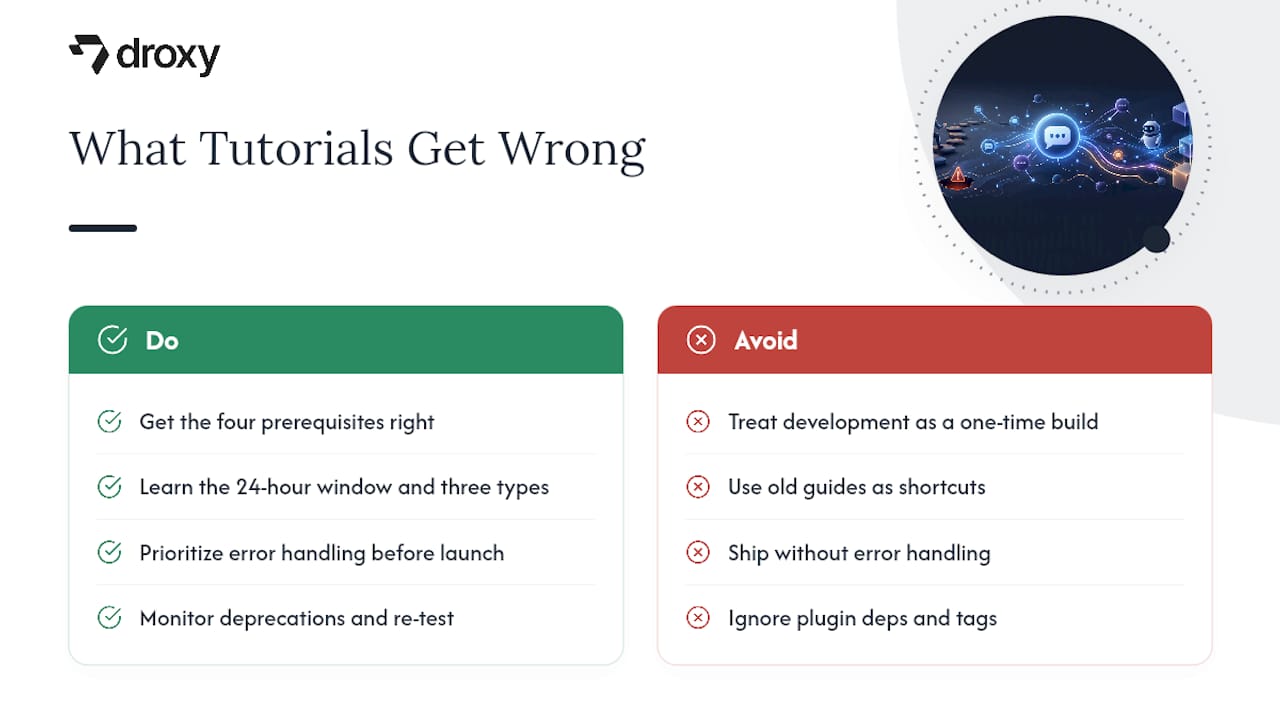
The judgment this research actually supports is narrower than most guides admit: get the four prerequisites right, understand the 24-hour window and its three messaging types cold, and treat every tutorial’s publish date as a warning label. A guide from two years ago is not a shortcut. It’s a liability wearing a shortcut’s clothes.
What’s overrated is the code itself. A GET verification handler and a POST event parser are maybe 40 lines combined. What’s underrated is the maintenance cycle: watching for deprecated tags, re-testing after Meta pushes API version changes, and keeping a fallback path for every conversation branch. If you only have time to do one thing well before launch, make it your error handling, not your happy path. The happy path always works in demos. It’s the edge cases that decide whether your bot survives contact with real users.
— Elena
When Droxy Makes More Sense Than a Custom Build
Droxy is the shortcut for teams who want the outcome of this tutorial without owning the webhook, the token rotation, or the tag deprecation watch list. Building your own server gives you full control over every branch of logic, and that’s the right call when your flows are genuinely custom. But if you’d rather provision your Facebook agent, plus WhatsApp, Instagram, phone, and website chat, from one no-code dashboard, Droxy handles the authorization and hosting for you.

Droxy’s Facebook agent connects to your Page the same way the no-code path in this guide describes, minus the manual webhook setup, and it comes with human handover, lead capture, and analytics built in rather than hand coded. Agencies managing multiple client Pages can white label the whole thing through the agency plan. Plans start at $16 a month on the Basic tier, scaling up to Advanced and Enterprise as your channel count grows. If your priority is time-to-live over full custom control, start a no-code platform setup today and have your Messenger agent answering real conversations quickly.
Where to Go Deeper on the Platform
For anything this guide simplifies, go straight to the source rather than a secondhand summary.
Meta’s Messenger Platform quick-start for the canonical webhook verification and subscription field steps.
Meta’s App Review documentation for exactly when Standard Access stops being enough.
Twilio’s Messenger and OpenAI integration tutorial for a runnable webhook plus LLM pattern.
Droxy’s ecommerce chatbot use cases for real-world flow examples once your webhook is live.
Sources
FAQ
Can I create a chatbot for Facebook Messenger myself?
Yes. You need a Facebook Page, a Meta app, a Page access token, and a webhook, and if you’re only messaging your own Page’s audience, App Review isn’t required for that Standard Access tier.
Can I build my own AI chatbot for Messenger?
Yes, by connecting your webhook to a language model instead of static reply logic, a pattern demonstrated in Twilio’s FastAPI and OpenAI tutorial. If you’d rather skip the server work, Droxy’s Facebook agent provisions AI powered replies without custom code.
How much does a Messenger bot cost to build?
A custom-coded bot costs only your development time and hosting, often free on entry-level tiers. A managed option like Droxy starts at $16 per month on the Basic plan, with Advanced and Enterprise tiers available as your needs grow.
How do I make my own AI in Messenger?
Wire your webhook’s POST handler to call an AI model’s API instead of returning a static reply, then send that generated text back through the Send API with the correct messaging_type. Keep your prompt instructions specific so replies sound conversational rather than robotic.
Recommended
Every working Messenger bot needs the same four pieces: a Facebook Page, a Meta app, a Page access token, and a verified webhook. If you want the fastest route, authorize a no-code platform against your Page and skip the server work entirely; if you want full control, a minimal webhook server hosted behind HTTPS gets you there in under an hour. Either way, ignore any tutorial published before this year. Several message tags now return error 100, and the old Chat Plugin is no longer in the docs.
TL;DR:
Building a Messenger bot requires a Facebook Page, a Meta app, a Page access token, and a verified webhook, with production needing App Review for stranger interactions.
Using a no-code platform simplifies setup to around 12 minutes but limits customization, while creating a minimal webhook server offers full control with a slightly longer setup time.
Successful deployment demands HTTPS hosting, environment variable management, and diligent testing of all event types, response times, and fallback handling before going live.
Messaging outside the 24-hour window requires specific tags or alternative APIs, and outdated tutorials fail to reflect recent platform restrictions and deprecated features.
For faster, less technical solutions, Droxy automates authorization, hosting, and human handover, starting at $16 per month, suitable for agencies managing multiple client pages.
DroxyBuild Messenger Support Without Server WorkDroxy helps businesses deploy customizable AI agents on Facebook and other channels, providing instant answers while keeping interactions aligned with their brand voice.Explore Droxy
Table of Contents
Prerequisites for Building a Messenger Chatbot
The Fastest Path to a Working Bot
Building the Webhook and Reply Logic
Deploying and Securing Your Webhook
Testing and Debugging Your Bot Before Launch
Production Rules That Break Bots in 2026
Using Templates, Quick Replies, and Human Handover
Why This Guide Reflects Real 2026 Platform Behavior
What Most Tutorials Get Wrong About This Build
When Droxy Makes More Sense Than a Custom Build
Where to Go Deeper on the Platform
Sources
Prerequisites for Building a Messenger Chatbot
Before writing a line of code, you need four accounts configured correctly, or nothing downstream will work. This is the part developers rush, and it’s the part that causes half the “my bot won’t respond” bug reports.
You need a Facebook Page (the bot’s identity), a Meta Business or Developer app tied to that Page, a Page access token generated inside that app, and a webhook endpoint the app can call. Each piece depends on the last: no Page means no token, no token means no webhook subscription. If your app only sends and receives messages for your own Page, Meta doesn’t require App Review for that Standard Access. The moment you want strangers to message your bot in production, you need Advanced Access, and that means submitting for App Review with the business_management permission and a demonstration of your use case.
Set these up before touching code:
A Facebook Page you administer, connected to a Meta Business Manager account
A Meta app created in the developer dashboard with the Messenger product added
A generated Page access token, copied somewhere secure, not into a chat log
Environment variables reserved for
PAGE_ACCESS_TOKEN,APP_SECRET, andVERIFY_TOKEN
The Fastest Path to a Working Bot
You have two realistic options, and the right one depends on how much control you actually need versus how fast you need something live.
Option A: No-code OAuth. You authorize a platform against your Facebook Page, it provisions the app, generates the token, and registers the webhook automatically. A hands-on build test for a basic FAQ bot took about 12 minutes using this route. The tradeoff is customization ceiling: you’re working inside someone else’s send logic, which is fine for support flows and terrible for anything that needs custom NLP branching.
Option B: Minimal webhook server. This takes longer, usually 15 to 30 minutes if you’ve done it before, but you own every line of logic. The sequence:
Create your Meta app and add the Messenger product.
Generate a Page access token from the app dashboard.
Write a small server (Node.js and Express is the common choice) with a GET route for webhook verification and a POST route for events.
Run it locally and expose it with ngrok to get a temporary HTTPS URL.
Paste that URL into the app’s webhook settings and verify.
Send a test message from your own Facebook account to the Page to trigger the conversation.
That last step matters more than it looks. Messenger’s Send API won’t let your bot message someone cold. The user has to message the Page first, which opens the 24-hour messaging window your bot then replies inside.
Pro Tip: Keep a second browser profile logged into a personal Facebook account strictly for testing. Toggling between your developer account and a “customer” account inside the same browser session is the single most common source of confusing, inconsistent webhook test results.
Building the Webhook and Reply Logic
Your webhook has exactly two jobs: prove to Meta it’s really you (the GET verification), and process incoming events fast enough to avoid errors (the POST handler). Meta’s quick-start guide documents both, and the pattern hasn’t changed much even as tags and templates have.
The GET handler responds to a challenge Meta sends when you register the URL:
app.get('/webhook', (req, res) => {
  const VERIFY_TOKEN = process.env.VERIFY_TOKEN;
  const mode = req.query['hub.mode'];
  const token = req.query['hub.verify_token'];
  const challenge = req.query['hub.challenge'];

  if (mode === 'subscribe' && token === VERIFY_TOKEN) {
    res.status(200).send(challenge);
  } else {
    res.sendStatus(403);
  }
});
The POST handler receives every message, postback, and quick reply tap:
app.post('/webhook', (req, res) => {
  const entries = req.body.entry || [];
  entries.forEach(entry => {
    const event = entry.messaging[0];
    const senderId = event.sender.id;

    if (event.message?.text) {
      sendMessage(senderId, `You said: ${event.message.text}`);
    } else if (event.postback) {
      sendMessage(senderId, `Got postback: ${event.postback.payload}`);
    }
  });
  res.sendStatus(200);
});
Your reply function calls the Send API, and messaging_type is not optional decoration. Get it wrong and Meta will reject the call:
async function sendMessage(recipientId, text) {
  await fetch(`https://graph.facebook.com/v19.0/me/messages?access_token=${process.env.PAGE_ACCESS_TOKEN}`, {
    method: 'POST',
    headers: { 'Content-Type': 'application/json' },
    body: JSON.stringify({
      recipient: { id: recipientId },
      messaging_type: 'RESPONSE',
      message: { text }
    })
  });
}
A few things that trip up first-time builders:
Attachments arrive under
event.message.attachments, notevent.message.text, so check for both.Postback payloads from buttons and the persistent menu land in
event.postback.payload.Always validate the
X-Hub-Signature-256header against yourAPP_SECRETbefore trusting a payload.Store all three secrets as environment variables, never hardcoded, even in a throwaway test project.
Deploying and Securing Your Webhook
Meta will not call an HTTP endpoint. Your webhook needs valid HTTPS whether you’re testing on your laptop or running in production, which is exactly why ngrok exists for local development.
Point ngrok at your local port, copy the generated https:// forwarding URL into the Meta app’s webhook field, and verify it the same way you would a production domain. It’s a tunnel, not a hosting solution, so don’t leave a client demo running on it past the demo. For anything permanent, move to a real host.
Deploy to Heroku, Vercel, or another cloud host that issues HTTPS by default.
Store
PAGE_ACCESS_TOKEN,APP_SECRET, andVERIFY_TOKENas platform config vars, never in your repository.Rotate the Page access token if it’s ever exposed in a log, a commit, or a screen share.
In the app dashboard’s Webhooks section, subscribe explicitly to
messages,messaging_postbacks, andmessage_deliveries.Send a real test message post-deploy before calling it done. A webhook that verified once can still fail silently after a redeploy.
Testing and Debugging Your Bot Before Launch
Most “my bot went silent” bugs trace back to one of three things: a bad signature check, an unhandled event type, or a branch with no fallback. Catch them here, not after launch.
Watch your ngrok request inspector or server logs while you send test messages, and confirm every event type actually reaches your handler: plain text, a quick reply tap, an attachment, and a postback from a button. Then deliberately send something your bot doesn’t expect, like an emoji-only message, and make sure it degrades to a fallback reply instead of a dead end.
Test all four event types individually before combining flows: text, quick reply, attachment, postback.
Confirm your server responds within 30 seconds. Slower responses get treated as failures.
Add a lightweight
/healthendpoint you can ping to catch downtime before a user does.Log every incoming payload during development, then strip verbose logging before production.
Pro Tip: Build one deliberate dead-end into your test suite, a message your logic genuinely doesn’t handle, and confirm it still returns something conversational. Bots that go completely silent on an unrecognized input lose users faster than bots that give an imperfect answer.
Production Rules That Break Bots in 2026
Messenger enforces a 24-hour messaging window: once a user messages your Page, you can send freely for 24 hours using messaging_type: RESPONSE. Outside that window you need UPDATE for user-initiated recurring content or a MESSAGE_TAG for narrow, approved exceptions.
That last category is where 2026 breaks a lot of old code. Tags like CONFIRMED_EVENT_UPDATE, ACCOUNT_UPDATE, and POST_PURCHASE_UPDATE began returning error 100 on April 27, 2026. If your bot depends on any of those, replace the logic with Utility Templates or the Marketing Messages API instead of patching around the error.
Respect the 30 second response requirement on every webhook call; slower responses count as failures against you.
Design conversations to complete inside the 24-hour window whenever possible, rather than relying on tags.
Expect the Chat Plugin to be absent from current documentation. It has been removed.
Watch for changes to recurring notification opt-ins, which have tightened alongside the tag deprecations.
Rate limits scale with engagement, but the responsiveness rule doesn’t bend for scale. A bot that’s fast for ten users needs to stay fast for ten thousand.
Using Templates, Quick Replies, and Human Handover
Raw text replies work for a demo. Real bots lean on structured Messenger features, and the platform supports templates, quick replies, a persistent menu, and a handover protocol for exactly this reason.
Use quick replies for short, disposable choices; use button templates when options need to persist or link out.
Keep persistent menu items minimal. Long menus render badly on mobile.
Route to a human agent through the handover protocol when confidence drops, and remember the
HUMAN_AGENTtag opens a separate 7-day messaging window for that agent.Always test template rendering on an actual phone screen, not just a desktop browser preview.
Why This Guide Reflects Real 2026 Platform Behavior
Building a Messenger bot in a live test using the no-code OAuth path took roughly 12 minutes to a working FAQ flow, matching the timing reported by Chatbotscape for a similar setup. That speed only holds if you skip the tags and plugins Meta has since retired. Older tutorials that still reference the Chat Plugin or the now-broken MESSAGE_TAG values will send you chasing errors that have nothing to do with your code.
For deeper build patterns, Droxy’s guides on training a chatbot’s responses and no-code deployment walk through the logic layer this article assumes you already have working. If you’re pairing your webhook with an LLM for generated replies, review how to phrase system instructions so responses sound human rather than robotic.
What Most Tutorials Get Wrong About This Build
The conventional advice treats Messenger bot development as a one-time build: follow the steps, ship it, move on. That’s backwards. The platform changes underneath you every few months, and the developers who get burned are the ones who built once in 2023 and never revisited their tag logic or plugin dependencies.
The judgment this research actually supports is narrower than most guides admit: get the four prerequisites right, understand the 24-hour window and its three messaging types cold, and treat every tutorial’s publish date as a warning label. A guide from two years ago is not a shortcut. It’s a liability wearing a shortcut’s clothes.
What’s overrated is the code itself. A GET verification handler and a POST event parser are maybe 40 lines combined. What’s underrated is the maintenance cycle: watching for deprecated tags, re-testing after Meta pushes API version changes, and keeping a fallback path for every conversation branch. If you only have time to do one thing well before launch, make it your error handling, not your happy path. The happy path always works in demos. It’s the edge cases that decide whether your bot survives contact with real users.
— Elena
When Droxy Makes More Sense Than a Custom Build
Droxy is the shortcut for teams who want the outcome of this tutorial without owning the webhook, the token rotation, or the tag deprecation watch list. Building your own server gives you full control over every branch of logic, and that’s the right call when your flows are genuinely custom. But if you’d rather provision your Facebook agent, plus WhatsApp, Instagram, phone, and website chat, from one no-code dashboard, Droxy handles the authorization and hosting for you.
Droxy’s Facebook agent connects to your Page the same way the no-code path in this guide describes, minus the manual webhook setup, and it comes with human handover, lead capture, and analytics built in rather than hand coded. Agencies managing multiple client Pages can white label the whole thing through the agency plan. Plans start at $16 a month on the Basic tier, scaling up to Advanced and Enterprise as your channel count grows. If your priority is time-to-live over full custom control, start a no-code platform setup today and have your Messenger agent answering real conversations quickly.
Where to Go Deeper on the Platform
For anything this guide simplifies, go straight to the source rather than a secondhand summary.
Meta’s Messenger Platform quick-start for the canonical webhook verification and subscription field steps.
Meta’s App Review documentation for exactly when Standard Access stops being enough.
Twilio’s Messenger and OpenAI integration tutorial for a runnable webhook plus LLM pattern.
Droxy’s ecommerce chatbot use cases for real-world flow examples once your webhook is live.
Sources
FAQ
Can I create a chatbot for Facebook Messenger myself?
Yes. You need a Facebook Page, a Meta app, a Page access token, and a webhook, and if you’re only messaging your own Page’s audience, App Review isn’t required for that Standard Access tier.
Can I build my own AI chatbot for Messenger?
Yes, by connecting your webhook to a language model instead of static reply logic, a pattern demonstrated in Twilio’s FastAPI and OpenAI tutorial. If you’d rather skip the server work, Droxy’s Facebook agent provisions AI powered replies without custom code.
How much does a Messenger bot cost to build?
A custom-coded bot costs only your development time and hosting, often free on entry-level tiers. A managed option like Droxy starts at $16 per month on the Basic plan, with Advanced and Enterprise tiers available as your needs grow.
How do I make my own AI in Messenger?
Wire your webhook’s POST handler to call an AI model’s API instead of returning a static reply, then send that generated text back through the Send API with the correct messaging_type. Keep your prompt instructions specific so replies sound conversational rather than robotic.
Recommended



🚀
Powered by Droxy
Turn every interaction into a conversion
Customer facing AI agents that engage, convert, and support so you can scale what matters.
✨
Learn more
Recent posts

Insights
3 min read
Introducing Agent Memories
Improve your agents' performance with Agent Memories. Prevent agents from repeating the same mistakes by giving them feedback.
Read more

Insights
15 min read
HVAC Marketing in 2025: The Definitive Lead Gen Guide
Discover 15 proven HVAC marketing strategies, plus learn how Droxy's AI website agent converts curious visitors into qualified leads by answering their questions instantly - right when they're most interested in your services.
Read more

Insights
10 min read
10 Best AI Sales Agents in 2025: Tested & Ranked
Discover the top 10 AI sales agents of 2025, designed to enhance lead generation, personalize outreach, and ultimately, close more deals
Read more
Insights
3 min read
Introducing Agent Memories
Improve your agents' performance with Agent Memories. Prevent agents from repeating the same mistakes by giving them feedback.
Read more
Insights
15 min read
HVAC Marketing in 2025: The Definitive Lead Gen Guide
Discover 15 proven HVAC marketing strategies, plus learn how Droxy's AI website agent converts curious visitors into qualified leads by answering their questions instantly - right when they're most interested in your services.
Read more