Stop Chatbot Breaches: AI Chatbot Security for Enterprise Teams
Stop Chatbot Breaches: AI Chatbot Security for Enterprise Teams
Insights
23 min
AI chatbots are not secure by default. They become secure when you layer engineering and governance controls on top of the model, starting with authentication checks at the point of retrieval, tight context minimization, and strict output validation. The top three risks dominating real incidents are prompt injection, sensitive-data leakage, and over-privileged actions. Frameworks like the OWASP GenAI LLM01 prompt injection risk list, the NIST AI Risk Management Framework, and GDPR’s DSAR obligations give you the starting map.
TL;DR:
Prompt injection remains the top security risk, especially via hidden or indirect embedding in external content like PDFs or scraped pages.
Multi-layer security controls, including encrypted transport, prompt filtering, and tenant-segmented retrieval databases, are essential to prevent cross-tenant data leaks.
Continuous verification of permissions at every retrieval, action, or session step is crucial to prevent hijacking and escalation during conversations.
Proper output validation, including sanitization and human approval for high-stakes actions, reduces the risk of unsafe model responses or malicious commands.
Using a centralized, no-code platform like Droxy simplifies deploying, managing, and securing chatbots by integrating controls across the entire workflow.
DroxyDeploy AI Agents With ConfidenceDroxy helps businesses deploy customizable AI agents across customer channels, with instant answers that match their brand voice.Explore Droxy
Table of Contents
AI Chatbot Security Risks You Need to Map First
Building a Secure Chatbot Architecture From the Ground Up
Locking Down Authentication and Access Control
Prompt Assembly and RAG Safeguards That Stop Leakage
Output Validation and Action Controls Worth Enforcing
Red-Teaming and Vulnerability Testing for LLM Systems
Monitoring, Logging, and Incident Response Playbooks
Privacy, GDPR, and Vendor Responsibilities You Can’t Outsource
Your Production Security Checklist Before Going Live
How a No-Code Platform Centralizes These Controls in Practice
What Security Teams Consistently Get Wrong About Chatbots
Deploy Secure AI Agents Without Building the Stack Yourself
Sources
AI Chatbot Security Risks You Need to Map First
Every chatbot deployment inherits a specific set of vulnerabilities that traditional web app security testing was never built to catch. You can’t patch what you haven’t named, so start by mapping these risks against your own architecture before you write a single mitigation.
Prompt injection is the headline risk, and it works exactly like it sounds. An attacker embeds instructions inside user input, a document, or even a retrieved web page, and the model follows those instructions instead of yours. OWASP’s LLM01 documentation breaks this into direct injection (typed straight into chat) and indirect injection (hidden in a PDF, email, or scraped page the model later ingests). System-prompt leakage is the companion risk: a well-crafted query convinces the model to reveal its own instructions, exposing internal logic, API names, or safety rules an attacker can then work around.
Retrieval-augmented generation introduces its own failure mode. If your vector database mixes documents from multiple tenants or departments without strict filtering, a query from Customer A can pull chunks that belong to Customer B. This cross-tenant exposure is one of the most underreported chatbot vulnerabilities because it looks like normal retrieval behavior in logs.
Beyond injection, three model-level risks deserve attention:
Hallucination as a security issue: a model confidently inventing a policy, price, or legal claim can create liability, not just embarrassment.
Data poisoning: corrupted training or fine-tuning data can bias outputs or plant backdoors triggered by specific phrases.
Jailbreaks: role-play framing, encoding tricks, or multi-turn manipulation that bypass safety guardrails the model was trained with.
Layer on API and credential attacks, insecure third-party integrations, and action abuse, where a compromised session triggers a real-world action like issuing a refund or sending an email, and you get the full threat picture. A documented attack chain from Trend Micro shows exactly how injection, prompt leakage, and internal API abuse can compound into full data exfiltration when defenses aren’t layered.
Building a Secure Chatbot Architecture From the Ground Up
Where you place a control matters as much as whether you have it. A secure chatbot pipeline distributes responsibility across distinct layers instead of trusting the model to police itself.
Ingress layer: TLS 1.2 or higher on every connection, with authentication happening before any request reaches the model. Azure Bot Service’s security guidelines require encrypted transport and secure connector configuration as a baseline, not an option.
Prompt assembly middleware: a server-side service that builds the final prompt, keeping system instructions separate from user input and retrieved content. This is the layer that enforces redaction, retention limits, and injection filtering before anything touches the model.
Retrieval layer: vector databases segmented by tenant, department, or sensitivity tier, with authorization checked again at query time, not just at login.
Model layer: the LLM itself, treated as untrusted output until validated.
Action layer: any function calls, API triggers, or write operations, gated behind approval logic.
Secure chatbot integration depends on treating every layer as if the one before it might already be compromised. That’s the zero-trust principle applied to conversational AI: no layer inherits trust from the layer above it just because a session looks authenticated.
Least privilege matters just as much here as in traditional infrastructure. A chatbot with read-only access to a CRM cannot leak write permissions it never had. Ephemeral context is the third design pattern worth building in from day one: don’t let conversation history live longer than the task requires. The EDPB’s 2025 guidance on AI privacy risks in LLMs frames this as a lifecycle risk problem, not a one-time configuration choice, and recommends building privacy-by-design controls into the pipeline rather than bolting them on after launch. Encryption at rest for retrieval stores and a dedicated secrets manager for API keys close out the architecture layer.
Locking Down Authentication and Access Control
Authentication for a chatbot has to do more work than a login form. It has to hold up across every retrieval, every tool call, and every session refresh, not just at the front door.
Strong authentication starts with multifactor authentication for any administrative or agent-configuration access, paired with scoped service credentials so the chatbot itself never runs under a broad admin identity. Role-based access control (RBAC) works for simpler deployments; attribute-based access control (ABAC) earns its complexity when permissions depend on context, like a support agent seeing order data only for customers in their assigned region.
The mistake most teams make is checking authorization once, at session start, and trusting it for the rest of the conversation. That’s backwards for chatbot security best practices. You need to:
Re-verify authorization at the moment of retrieval, not just at login, since sessions can be hijacked or escalated mid-conversation.
Re-check permissions again immediately before any action with real-world consequences, like a refund, a booking change, or an email send.
Issue per-session tokens with short expiry windows instead of long-lived credentials.
Enforce token budgets that cap how much context a single session can pull from retrieval, limiting the blast radius of a compromised session.
Throttle requests per user and per IP to blunt automated prompt-fuzzing attempts before they scale.
Azure’s bot security guidance backs this layered approach, recommending authentication patterns tied to secure connectors rather than a single static credential shared across the whole integration.
Prompt Assembly and RAG Safeguards That Stop Leakage
The single highest-leverage fix in chatbot data protection is separating system instructions from user-supplied content at the moment the prompt gets built. If your architecture concatenates a system prompt, retrieved documents, and user input into one string without clear boundaries, you’ve built an injection vector by default. A dedicated prompt assembly service, sitting server-side between the user and the model, is what makes that separation enforceable rather than aspirational, and it’s also the layer that makes GDPR-style redaction and retention rules operational instead of theoretical, according to guidance on building GDPR-compliant chatbots.
Retrieval safeguards matter just as much as prompt structure:
Redact personally identifiable information from retrieved context before it ever reaches the model, not after.
Cap the retrieval window so a single query can’t pull an entire knowledge base into context.
Scan external or user-uploaded content for injection patterns before indexing it into your vector store.
Tag retrieved passages with provenance metadata so the system can flag content pulled from low-trust sources.
Score and rank passages by relevance and trust level before including them in context, rather than dumping every match into the prompt.
OWASP’s guidance on sensitive information disclosure specifically recommends retrieval authorization checks and content filtering as baseline mitigations for RAG systems, not advanced add-ons.
Pro Tip: Treat every retrieved document as untrusted input, the same way you’d treat unvalidated user data in a traditional web app. If a PDF a customer uploads can influence what the model says to the next customer, you’ve got a provenance problem worth fixing before launch.
Output Validation and Action Controls Worth Enforcing
A model’s output is not a safe string until you’ve proven otherwise. Treating generated text as trusted content the moment it leaves the model is how chatbots become backdoors into rendering engines, downstream tools, and privileged systems.
Sanitize every renderable output before it hits a browser or a downstream tool. That means stripping active HTML, disabling auto-execution of embedded links, and never letting model-generated code run without a sandbox between it and production systems. A model that can format a link can, under the wrong prompt, format a malicious one just as easily.
Action controls close the second half of the gap:
Require human approval for any irreversible action: refunds above a threshold, account deletions, or bulk data exports.
Escrow high-risk changes behind a review queue instead of executing them the instant the model requests them.
Build a dedicated safe renderer for chat UI that treats every model output as plain text unless explicitly allow-listed for formatting.
Log every action request separately from the conversation log, so action abuse shows up in review even if the surrounding chat looks benign.
This is where the Trend Micro attack chain becomes instructive again: the breach case study escalated specifically because an internal API trusted a model-generated request without an approval gate in between.
Red-Teaming and Vulnerability Testing for LLM Systems
Traditional penetration testing doesn’t map cleanly onto chatbots, because the attack surface is conversational, not just network-based. Chatbot vulnerability testing needs its own methodology, run on a schedule, not as a one-time pre-launch checkbox.
Run automated prompt-injection fuzzers against every input surface, including file uploads and any field that eventually reaches the model, not just the main chat box.
Build adversarial input suites that combine encoding tricks, role-play framing, and multi-turn manipulation, since single-turn jailbreak attempts miss most of what a patient attacker actually tries.
Schedule red-team scenarios that specifically probe system-prompt leakage and action chaining, the two failure modes that turned a single injection into a full breach in the Trend Micro case.
Run AI-SPM posture scans to inventory every model, connector, and vector database in use, since shadow deployments are a common source of unmonitored risk.
Verify vector DB integrity on a schedule, checking for unauthorized document injection or index poisoning.
Gate CI/CD pipelines so a model or prompt template update can’t ship to production without passing the same injection suite the last version did.
AI security posture management platforms that continuously scan for these misconfigurations are becoming standard practice precisely because static, pre-launch testing misses drift. As Trend Micro’s research notes, AI-SPM tools that inventory models and scan vector databases catch exposures that a one-time audit would miss entirely. A multi-LLM audit tool can help you check behavior consistency across models if your stack spans more than one provider.
Adversarial testing insight: production checklists built for AI chatbot deployments consistently flag the same failure cluster, prompt injection, broken authorization around data access, and unsafe output rendering, as the most common gaps found during pre-launch review, according to a 2026 production security checklist.
Monitoring, Logging, and Incident Response Playbooks
You cannot investigate what you didn’t log, and chatbot logging needs to capture more than the visible conversation. Capture the full prompt assembly (system instructions plus retrieved context plus user input), the model’s raw response, any action requests it triggered, and the approval decision tied to each one. Redact PII from logs at write time, not retroactively, since a breach in your log store is a second breach on top of the first.
Anomaly detection for chatbots looks different from traditional network monitoring:
Flag repeated variations of similar prompts from one session, a classic sign of prompt-fuzzing in progress.
Watch for retrieval patterns that pull unusually broad or cross-tenant context in a single query.
Alert on any action request that follows immediately after a flagged or unusual retrieval.
When something does trigger, your incident playbook needs four concrete steps: contain the session (revoke tokens, disable the affected integration), notify affected users where personal data was exposed, report to your regulator within the legally required window, and run remediation that closes the specific gap, not just a general patch. That regulatory window is not negotiable in the UK, where GDPR requires a DSAR response within 30 days, and a breach affecting personal data can trigger separate, faster reporting obligations.
Privacy, GDPR, and Vendor Responsibilities You Can’t Outsource
If you deploy a chatbot that processes customer data, you are almost always the data controller, and your vendor is the processor. That distinction determines who answers a regulator’s questions when something goes wrong, and it’s usually you.
Controller status brings concrete obligations. You owe users transparency about when they’re talking to an AI, what data it retains, and how long. You owe regulators a completed Data Protection Impact Assessment (DPIA) before launch if the deployment involves large-scale personal data processing, and a signed Data Processing Agreement (DPA) with every vendor touching that data. The EDPB’s LLM risk guidance treats the DPIA as a living document that should be revisited as the model or its retrieval sources change, not a one-time filing.
Practical steps worth operationalizing now:
Set a retention policy that auto-deletes conversation logs after a defined window, following the same minimization principle Azure’s bot guidance recommends for stored messages.
Confirm your DPA covers sub-processors, including whichever LLM provider sits behind your chatbot.
Map data transfer mechanisms if any vendor processes data outside your users’ jurisdiction.
Build a DSAR workflow that can actually locate a user’s chatbot history within the 30-day UK GDPR window, since scattered logs across three systems make that deadline nearly impossible to hit under pressure.
Your Production Security Checklist Before Going Live
A phased checklist keeps chatbot security best practices from turning into a vague aspiration. Split it into what happens before launch, at launch, and continuously afterward.
Pre-deploy: complete an LLM-specific threat model, finish the DPIA, get the DPA signed with every vendor in the chain, and run prompt-safety tests against your actual system prompt.
Go-live: confirm authentication is enforced on every endpoint, retrieval authorization checks fire on every query, output validation runs before rendering, and human approval flows are wired into any irreversible action.
Ongoing: schedule recurring red-team exercises, run AI-SPM posture scans on a fixed cadence, review logs for anomalous retrieval or action patterns weekly, and enforce your retention policy automatically rather than manually.
Phase | Priority control | Why it matters |
|---|---|---|
Pre-deploy | LLM threat model + DPIA | Surfaces injection and data-exposure risks before real users hit them |
Go-live | Retrieval re-authorization | Stops session hijacking from turning into cross-tenant data leakage |
Ongoing | Scheduled red-team + AI-SPM scans | Catches drift and shadow deployments static audits miss |
Our internal guide on chatbot best practices walks through several of these operational habits in more depth if you’re building the checklist for your own team.
How a No-Code Platform Centralizes These Controls in Practice
Building every layer described above from scratch is a real engineering commitment, and it’s exactly why middleware platforms exist. A no-code layer that centralizes prompt assembly, retention rules, and human hand-off removes the temptation to skip a control because it’s inconvenient to build twice.
A no-code platform can be built around this centralization pattern rather than leaving each channel to configure its own security posture separately, offering features such as multichannel agents running through the same governed backend instead of separate integrations, integrations connecting to existing business systems through API or Zapier, analytics providing visibility into conversation volume and outcomes without a separate monitoring stack, human hand-off for flagged or high-risk conversations, and deep customization to keep brand voice and tone consistent without exposing raw system prompts to end users.
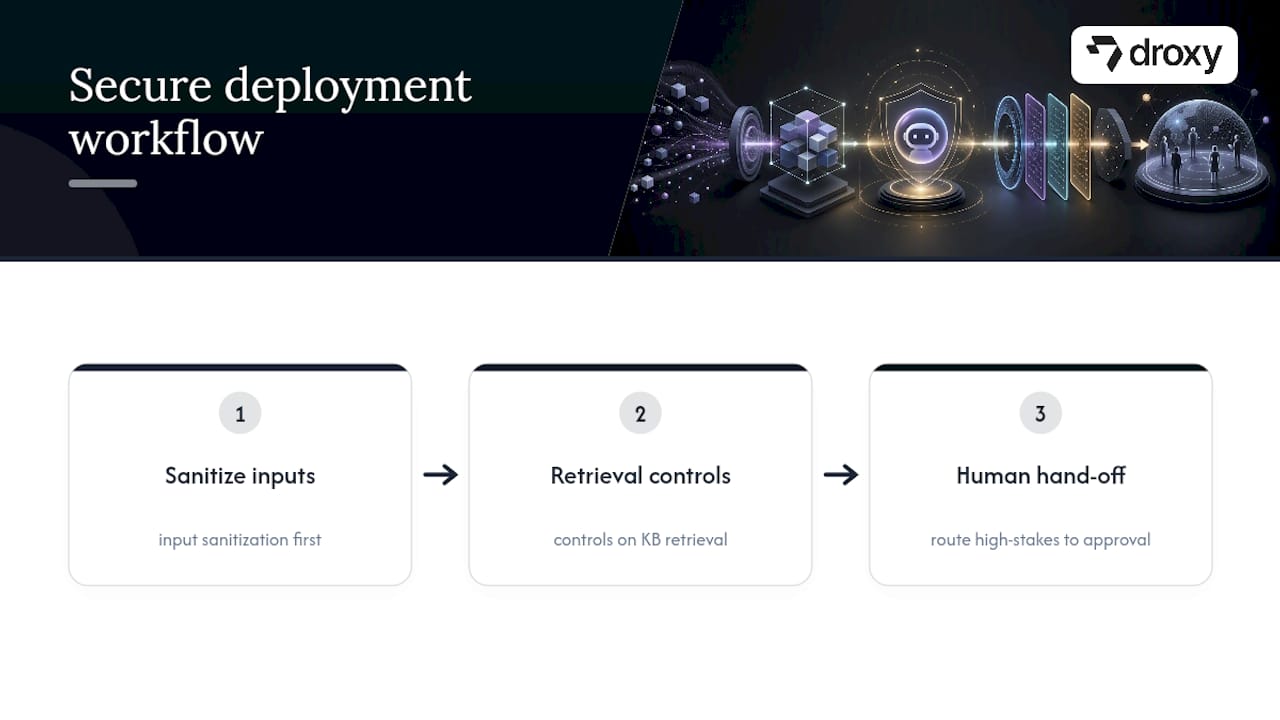
A safe deployment workflow on a platform like this typically runs sanitization on inputs first, applies retrieval controls to whatever knowledge base the agent draws from, and routes anything high-stakes through an approval or hand-off step before it becomes an action. For deeper background on the agent layer itself, our piece on what LLM agents are explains how the model, retrieval, and action layers relate to each other in practice.
What Security Teams Consistently Get Wrong About Chatbots
Most teams treat chatbot security as a launch task instead of a living program, and that’s the gap that gets exploited. The fix isn’t exotic: run a proper LLM threat model before you ship anything, and put a red-team test on the calendar now, not after an incident forces the issue. Tighten your retention policy and re-check authorization at retrieval today. Those two moves alone close the gaps attackers use most often.
— Elena
Deploy Secure AI Agents Without Building the Stack Yourself
Droxy is the alternative to building a custom LLM security pipeline in house: instead of assembling prompt middleware, retrieval controls, and hand-off logic across separate vendors, you get one governed platform where those controls already sit in the workflow.

Every deployment includes deep customization to match your brand voice, human hand-off for anything that needs a person’s judgment, and integrations into your existing systems through API or Zapier, so security controls don’t live in a silo separate from the rest of your stack. Whether you need an AI powered Website agent or a WhatsApp agent handling customer conversations across regions, the same governed backend applies to both. Plans start at $16 per month on the Basic tier, with Advanced and Enterprise tiers available as your channel count and compliance needs grow. Check current pricing and start a trial to see how the controls described above map onto your own deployment.
Sources
FAQ
Are AI Chatbots Secure?
AI chatbots are only as secure as the controls built around them. Encryption, authentication, retrieval re-checks, and output validation are what make a deployment secure, not the model itself.
Should I Be Careful With What I Share on AI Chatbots?
Yes. Treat any AI chatbot the way you’d treat an unencrypted form: avoid sharing passwords, financial account numbers, or health details unless you know the vendor’s retention and encryption practices. Under UK GDPR, you have a right to request what data a chatbot vendor holds on you, and the organization must respond within 30 days.
What Is the Most Secure AI Chatbot?
There is no single “most secure” chatbot, since security depends on how each deployment implements authentication, encryption, and data handling rather than which model powers it. A platform that centralizes prompt assembly, retrieval authorization, and human hand-off, like Droxy’s approach to multichannel agents, reduces the number of places a security gap can hide compared to stitching together separate tools per channel.
Does ChatGPT Track You?
General-purpose AI chatbots like ChatGPT can retain conversation data depending on account settings and the provider’s privacy policy, and that data may be used to improve the underlying model unless a user opts out. Enterprise chatbot deployments should never rely on a consumer AI tool’s default retention settings; a dedicated business platform with its own retention policy and DPA gives you actual control over what’s stored and for how long.
Recommended
AI chatbots are not secure by default. They become secure when you layer engineering and governance controls on top of the model, starting with authentication checks at the point of retrieval, tight context minimization, and strict output validation. The top three risks dominating real incidents are prompt injection, sensitive-data leakage, and over-privileged actions. Frameworks like the OWASP GenAI LLM01 prompt injection risk list, the NIST AI Risk Management Framework, and GDPR’s DSAR obligations give you the starting map.
TL;DR:
Prompt injection remains the top security risk, especially via hidden or indirect embedding in external content like PDFs or scraped pages.
Multi-layer security controls, including encrypted transport, prompt filtering, and tenant-segmented retrieval databases, are essential to prevent cross-tenant data leaks.
Continuous verification of permissions at every retrieval, action, or session step is crucial to prevent hijacking and escalation during conversations.
Proper output validation, including sanitization and human approval for high-stakes actions, reduces the risk of unsafe model responses or malicious commands.
Using a centralized, no-code platform like Droxy simplifies deploying, managing, and securing chatbots by integrating controls across the entire workflow.
DroxyDeploy AI Agents With ConfidenceDroxy helps businesses deploy customizable AI agents across customer channels, with instant answers that match their brand voice.Explore Droxy
Table of Contents
AI Chatbot Security Risks You Need to Map First
Building a Secure Chatbot Architecture From the Ground Up
Locking Down Authentication and Access Control
Prompt Assembly and RAG Safeguards That Stop Leakage
Output Validation and Action Controls Worth Enforcing
Red-Teaming and Vulnerability Testing for LLM Systems
Monitoring, Logging, and Incident Response Playbooks
Privacy, GDPR, and Vendor Responsibilities You Can’t Outsource
Your Production Security Checklist Before Going Live
How a No-Code Platform Centralizes These Controls in Practice
What Security Teams Consistently Get Wrong About Chatbots
Deploy Secure AI Agents Without Building the Stack Yourself
Sources
AI Chatbot Security Risks You Need to Map First
Every chatbot deployment inherits a specific set of vulnerabilities that traditional web app security testing was never built to catch. You can’t patch what you haven’t named, so start by mapping these risks against your own architecture before you write a single mitigation.
Prompt injection is the headline risk, and it works exactly like it sounds. An attacker embeds instructions inside user input, a document, or even a retrieved web page, and the model follows those instructions instead of yours. OWASP’s LLM01 documentation breaks this into direct injection (typed straight into chat) and indirect injection (hidden in a PDF, email, or scraped page the model later ingests). System-prompt leakage is the companion risk: a well-crafted query convinces the model to reveal its own instructions, exposing internal logic, API names, or safety rules an attacker can then work around.
Retrieval-augmented generation introduces its own failure mode. If your vector database mixes documents from multiple tenants or departments without strict filtering, a query from Customer A can pull chunks that belong to Customer B. This cross-tenant exposure is one of the most underreported chatbot vulnerabilities because it looks like normal retrieval behavior in logs.
Beyond injection, three model-level risks deserve attention:
Hallucination as a security issue: a model confidently inventing a policy, price, or legal claim can create liability, not just embarrassment.
Data poisoning: corrupted training or fine-tuning data can bias outputs or plant backdoors triggered by specific phrases.
Jailbreaks: role-play framing, encoding tricks, or multi-turn manipulation that bypass safety guardrails the model was trained with.
Layer on API and credential attacks, insecure third-party integrations, and action abuse, where a compromised session triggers a real-world action like issuing a refund or sending an email, and you get the full threat picture. A documented attack chain from Trend Micro shows exactly how injection, prompt leakage, and internal API abuse can compound into full data exfiltration when defenses aren’t layered.
Building a Secure Chatbot Architecture From the Ground Up
Where you place a control matters as much as whether you have it. A secure chatbot pipeline distributes responsibility across distinct layers instead of trusting the model to police itself.
Ingress layer: TLS 1.2 or higher on every connection, with authentication happening before any request reaches the model. Azure Bot Service’s security guidelines require encrypted transport and secure connector configuration as a baseline, not an option.
Prompt assembly middleware: a server-side service that builds the final prompt, keeping system instructions separate from user input and retrieved content. This is the layer that enforces redaction, retention limits, and injection filtering before anything touches the model.
Retrieval layer: vector databases segmented by tenant, department, or sensitivity tier, with authorization checked again at query time, not just at login.
Model layer: the LLM itself, treated as untrusted output until validated.
Action layer: any function calls, API triggers, or write operations, gated behind approval logic.
Secure chatbot integration depends on treating every layer as if the one before it might already be compromised. That’s the zero-trust principle applied to conversational AI: no layer inherits trust from the layer above it just because a session looks authenticated.
Least privilege matters just as much here as in traditional infrastructure. A chatbot with read-only access to a CRM cannot leak write permissions it never had. Ephemeral context is the third design pattern worth building in from day one: don’t let conversation history live longer than the task requires. The EDPB’s 2025 guidance on AI privacy risks in LLMs frames this as a lifecycle risk problem, not a one-time configuration choice, and recommends building privacy-by-design controls into the pipeline rather than bolting them on after launch. Encryption at rest for retrieval stores and a dedicated secrets manager for API keys close out the architecture layer.
Locking Down Authentication and Access Control
Authentication for a chatbot has to do more work than a login form. It has to hold up across every retrieval, every tool call, and every session refresh, not just at the front door.
Strong authentication starts with multifactor authentication for any administrative or agent-configuration access, paired with scoped service credentials so the chatbot itself never runs under a broad admin identity. Role-based access control (RBAC) works for simpler deployments; attribute-based access control (ABAC) earns its complexity when permissions depend on context, like a support agent seeing order data only for customers in their assigned region.
The mistake most teams make is checking authorization once, at session start, and trusting it for the rest of the conversation. That’s backwards for chatbot security best practices. You need to:
Re-verify authorization at the moment of retrieval, not just at login, since sessions can be hijacked or escalated mid-conversation.
Re-check permissions again immediately before any action with real-world consequences, like a refund, a booking change, or an email send.
Issue per-session tokens with short expiry windows instead of long-lived credentials.
Enforce token budgets that cap how much context a single session can pull from retrieval, limiting the blast radius of a compromised session.
Throttle requests per user and per IP to blunt automated prompt-fuzzing attempts before they scale.
Azure’s bot security guidance backs this layered approach, recommending authentication patterns tied to secure connectors rather than a single static credential shared across the whole integration.
Prompt Assembly and RAG Safeguards That Stop Leakage
The single highest-leverage fix in chatbot data protection is separating system instructions from user-supplied content at the moment the prompt gets built. If your architecture concatenates a system prompt, retrieved documents, and user input into one string without clear boundaries, you’ve built an injection vector by default. A dedicated prompt assembly service, sitting server-side between the user and the model, is what makes that separation enforceable rather than aspirational, and it’s also the layer that makes GDPR-style redaction and retention rules operational instead of theoretical, according to guidance on building GDPR-compliant chatbots.
Retrieval safeguards matter just as much as prompt structure:
Redact personally identifiable information from retrieved context before it ever reaches the model, not after.
Cap the retrieval window so a single query can’t pull an entire knowledge base into context.
Scan external or user-uploaded content for injection patterns before indexing it into your vector store.
Tag retrieved passages with provenance metadata so the system can flag content pulled from low-trust sources.
Score and rank passages by relevance and trust level before including them in context, rather than dumping every match into the prompt.
OWASP’s guidance on sensitive information disclosure specifically recommends retrieval authorization checks and content filtering as baseline mitigations for RAG systems, not advanced add-ons.
Pro Tip: Treat every retrieved document as untrusted input, the same way you’d treat unvalidated user data in a traditional web app. If a PDF a customer uploads can influence what the model says to the next customer, you’ve got a provenance problem worth fixing before launch.
Output Validation and Action Controls Worth Enforcing
A model’s output is not a safe string until you’ve proven otherwise. Treating generated text as trusted content the moment it leaves the model is how chatbots become backdoors into rendering engines, downstream tools, and privileged systems.
Sanitize every renderable output before it hits a browser or a downstream tool. That means stripping active HTML, disabling auto-execution of embedded links, and never letting model-generated code run without a sandbox between it and production systems. A model that can format a link can, under the wrong prompt, format a malicious one just as easily.
Action controls close the second half of the gap:
Require human approval for any irreversible action: refunds above a threshold, account deletions, or bulk data exports.
Escrow high-risk changes behind a review queue instead of executing them the instant the model requests them.
Build a dedicated safe renderer for chat UI that treats every model output as plain text unless explicitly allow-listed for formatting.
Log every action request separately from the conversation log, so action abuse shows up in review even if the surrounding chat looks benign.
This is where the Trend Micro attack chain becomes instructive again: the breach case study escalated specifically because an internal API trusted a model-generated request without an approval gate in between.
Red-Teaming and Vulnerability Testing for LLM Systems
Traditional penetration testing doesn’t map cleanly onto chatbots, because the attack surface is conversational, not just network-based. Chatbot vulnerability testing needs its own methodology, run on a schedule, not as a one-time pre-launch checkbox.
Run automated prompt-injection fuzzers against every input surface, including file uploads and any field that eventually reaches the model, not just the main chat box.
Build adversarial input suites that combine encoding tricks, role-play framing, and multi-turn manipulation, since single-turn jailbreak attempts miss most of what a patient attacker actually tries.
Schedule red-team scenarios that specifically probe system-prompt leakage and action chaining, the two failure modes that turned a single injection into a full breach in the Trend Micro case.
Run AI-SPM posture scans to inventory every model, connector, and vector database in use, since shadow deployments are a common source of unmonitored risk.
Verify vector DB integrity on a schedule, checking for unauthorized document injection or index poisoning.
Gate CI/CD pipelines so a model or prompt template update can’t ship to production without passing the same injection suite the last version did.
AI security posture management platforms that continuously scan for these misconfigurations are becoming standard practice precisely because static, pre-launch testing misses drift. As Trend Micro’s research notes, AI-SPM tools that inventory models and scan vector databases catch exposures that a one-time audit would miss entirely. A multi-LLM audit tool can help you check behavior consistency across models if your stack spans more than one provider.
Adversarial testing insight: production checklists built for AI chatbot deployments consistently flag the same failure cluster, prompt injection, broken authorization around data access, and unsafe output rendering, as the most common gaps found during pre-launch review, according to a 2026 production security checklist.
Monitoring, Logging, and Incident Response Playbooks
You cannot investigate what you didn’t log, and chatbot logging needs to capture more than the visible conversation. Capture the full prompt assembly (system instructions plus retrieved context plus user input), the model’s raw response, any action requests it triggered, and the approval decision tied to each one. Redact PII from logs at write time, not retroactively, since a breach in your log store is a second breach on top of the first.
Anomaly detection for chatbots looks different from traditional network monitoring:
Flag repeated variations of similar prompts from one session, a classic sign of prompt-fuzzing in progress.
Watch for retrieval patterns that pull unusually broad or cross-tenant context in a single query.
Alert on any action request that follows immediately after a flagged or unusual retrieval.
When something does trigger, your incident playbook needs four concrete steps: contain the session (revoke tokens, disable the affected integration), notify affected users where personal data was exposed, report to your regulator within the legally required window, and run remediation that closes the specific gap, not just a general patch. That regulatory window is not negotiable in the UK, where GDPR requires a DSAR response within 30 days, and a breach affecting personal data can trigger separate, faster reporting obligations.
Privacy, GDPR, and Vendor Responsibilities You Can’t Outsource
If you deploy a chatbot that processes customer data, you are almost always the data controller, and your vendor is the processor. That distinction determines who answers a regulator’s questions when something goes wrong, and it’s usually you.
Controller status brings concrete obligations. You owe users transparency about when they’re talking to an AI, what data it retains, and how long. You owe regulators a completed Data Protection Impact Assessment (DPIA) before launch if the deployment involves large-scale personal data processing, and a signed Data Processing Agreement (DPA) with every vendor touching that data. The EDPB’s LLM risk guidance treats the DPIA as a living document that should be revisited as the model or its retrieval sources change, not a one-time filing.
Practical steps worth operationalizing now:
Set a retention policy that auto-deletes conversation logs after a defined window, following the same minimization principle Azure’s bot guidance recommends for stored messages.
Confirm your DPA covers sub-processors, including whichever LLM provider sits behind your chatbot.
Map data transfer mechanisms if any vendor processes data outside your users’ jurisdiction.
Build a DSAR workflow that can actually locate a user’s chatbot history within the 30-day UK GDPR window, since scattered logs across three systems make that deadline nearly impossible to hit under pressure.
Your Production Security Checklist Before Going Live
A phased checklist keeps chatbot security best practices from turning into a vague aspiration. Split it into what happens before launch, at launch, and continuously afterward.
Pre-deploy: complete an LLM-specific threat model, finish the DPIA, get the DPA signed with every vendor in the chain, and run prompt-safety tests against your actual system prompt.
Go-live: confirm authentication is enforced on every endpoint, retrieval authorization checks fire on every query, output validation runs before rendering, and human approval flows are wired into any irreversible action.
Ongoing: schedule recurring red-team exercises, run AI-SPM posture scans on a fixed cadence, review logs for anomalous retrieval or action patterns weekly, and enforce your retention policy automatically rather than manually.
Phase | Priority control | Why it matters |
|---|---|---|
Pre-deploy | LLM threat model + DPIA | Surfaces injection and data-exposure risks before real users hit them |
Go-live | Retrieval re-authorization | Stops session hijacking from turning into cross-tenant data leakage |
Ongoing | Scheduled red-team + AI-SPM scans | Catches drift and shadow deployments static audits miss |
Our internal guide on chatbot best practices walks through several of these operational habits in more depth if you’re building the checklist for your own team.
How a No-Code Platform Centralizes These Controls in Practice
Building every layer described above from scratch is a real engineering commitment, and it’s exactly why middleware platforms exist. A no-code layer that centralizes prompt assembly, retention rules, and human hand-off removes the temptation to skip a control because it’s inconvenient to build twice.
A no-code platform can be built around this centralization pattern rather than leaving each channel to configure its own security posture separately, offering features such as multichannel agents running through the same governed backend instead of separate integrations, integrations connecting to existing business systems through API or Zapier, analytics providing visibility into conversation volume and outcomes without a separate monitoring stack, human hand-off for flagged or high-risk conversations, and deep customization to keep brand voice and tone consistent without exposing raw system prompts to end users.
A safe deployment workflow on a platform like this typically runs sanitization on inputs first, applies retrieval controls to whatever knowledge base the agent draws from, and routes anything high-stakes through an approval or hand-off step before it becomes an action. For deeper background on the agent layer itself, our piece on what LLM agents are explains how the model, retrieval, and action layers relate to each other in practice.
What Security Teams Consistently Get Wrong About Chatbots
Most teams treat chatbot security as a launch task instead of a living program, and that’s the gap that gets exploited. The fix isn’t exotic: run a proper LLM threat model before you ship anything, and put a red-team test on the calendar now, not after an incident forces the issue. Tighten your retention policy and re-check authorization at retrieval today. Those two moves alone close the gaps attackers use most often.
— Elena
Deploy Secure AI Agents Without Building the Stack Yourself
Droxy is the alternative to building a custom LLM security pipeline in house: instead of assembling prompt middleware, retrieval controls, and hand-off logic across separate vendors, you get one governed platform where those controls already sit in the workflow.
Every deployment includes deep customization to match your brand voice, human hand-off for anything that needs a person’s judgment, and integrations into your existing systems through API or Zapier, so security controls don’t live in a silo separate from the rest of your stack. Whether you need an AI powered Website agent or a WhatsApp agent handling customer conversations across regions, the same governed backend applies to both. Plans start at $16 per month on the Basic tier, with Advanced and Enterprise tiers available as your channel count and compliance needs grow. Check current pricing and start a trial to see how the controls described above map onto your own deployment.
Sources
FAQ
Are AI Chatbots Secure?
AI chatbots are only as secure as the controls built around them. Encryption, authentication, retrieval re-checks, and output validation are what make a deployment secure, not the model itself.
Should I Be Careful With What I Share on AI Chatbots?
Yes. Treat any AI chatbot the way you’d treat an unencrypted form: avoid sharing passwords, financial account numbers, or health details unless you know the vendor’s retention and encryption practices. Under UK GDPR, you have a right to request what data a chatbot vendor holds on you, and the organization must respond within 30 days.
What Is the Most Secure AI Chatbot?
There is no single “most secure” chatbot, since security depends on how each deployment implements authentication, encryption, and data handling rather than which model powers it. A platform that centralizes prompt assembly, retrieval authorization, and human hand-off, like Droxy’s approach to multichannel agents, reduces the number of places a security gap can hide compared to stitching together separate tools per channel.
Does ChatGPT Track You?
General-purpose AI chatbots like ChatGPT can retain conversation data depending on account settings and the provider’s privacy policy, and that data may be used to improve the underlying model unless a user opts out. Enterprise chatbot deployments should never rely on a consumer AI tool’s default retention settings; a dedicated business platform with its own retention policy and DPA gives you actual control over what’s stored and for how long.
Recommended



🚀
Powered by Droxy
Turn every interaction into a conversion
Customer facing AI agents that engage, convert, and support so you can scale what matters.
✨
Learn more
Recent posts

Insights
3 min read
Introducing Agent Memories
Improve your agents' performance with Agent Memories. Prevent agents from repeating the same mistakes by giving them feedback.
Read more

Insights
15 min read
HVAC Marketing in 2025: The Definitive Lead Gen Guide
Discover 15 proven HVAC marketing strategies, plus learn how Droxy's AI website agent converts curious visitors into qualified leads by answering their questions instantly - right when they're most interested in your services.
Read more

Insights
10 min read
10 Best AI Sales Agents in 2025: Tested & Ranked
Discover the top 10 AI sales agents of 2025, designed to enhance lead generation, personalize outreach, and ultimately, close more deals
Read more
Insights
3 min read
Introducing Agent Memories
Improve your agents' performance with Agent Memories. Prevent agents from repeating the same mistakes by giving them feedback.
Read more
Insights
15 min read
HVAC Marketing in 2025: The Definitive Lead Gen Guide
Discover 15 proven HVAC marketing strategies, plus learn how Droxy's AI website agent converts curious visitors into qualified leads by answering their questions instantly - right when they're most interested in your services.
Read more